About this app
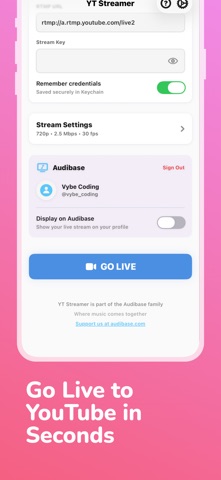
YT Streamer lets you broadcast live to YouTube directly from your iPhone with just a few taps. SIMPLE SETUP Sign in with your Google account and YT Streamer automatically connects to your YouTube channel. No need to manually copy RTMP URLs or stream keys - we handle everything for you. KEY FEATURES • One-tap Google Sign-In integration • Create new YouTube broadcasts instantly • Automatic RTMP configuration • Adjustable video quality (480p to 1080p) • Configurable bitrate and frame rate • Front and back camera support • Mute/unmute audio during stream • Real-time connection status • Stream timer display • Secure credential storage in Keychain PROFESSIONAL STREAMING Configure your stream settings to match your needs: - Resolution: 480p, 720p, or 1080p - Video bitrate: 1-8 Mbps - Frame rate: 24, 30, or 60 fps - Audio bitrate: 64-256 kbps - Stereo audio support STAY CONNECTED YT Streamer keeps your screen awake during broadcasts so you never accidentally end your stream. Auto-reconnect technology helps maintain your connection if network issues occur. AUDIBASE INTEGRATION Display your live stream on your Audibase profile to reach more viewers across platforms. Whether you're streaming gameplay, vlogs, tutorials, events, or just chatting with your audience - YT Streamer makes it easy to go live from anywhere. Part of the Audibase family.
Latest release
What’s New
In app tutorial New onboarding walkthrough that guides you through signing in, creating a broadcast, and going live. It can be accessed anytime from the help button in the toolbar. Share your stream Quickly share, copy, or open your YouTube watch link directly from the broadcast card or the live stream screen. Delete account A delete account option has been added in Settings for full account control. Smarter broadcast creation Automatically retries with compatible settings if YouTube rejects the initial broadcast configuration. Auto refresh broadcasts Your broadcast list now loads automatically when you sign in or return to the home screen. Reliability improvements Better error handling across YouTube API calls and a cleaner stream shutdown flow.
Audience growth
Ratings growth
Baseline captured. Growth appears after the crawler observes a changed rating count.
Momentum comes from crawler snapshots for the tracked storefront. “Viral growth signal” means unusually fast recent rating gains; it is an indicator, not download data.
Price tracking
Price intelligence
First snapshot captured. The trend line starts after the next crawler price observation.
- First observed Sep 11, 2026 · 4:59 PM Free
Screenshots