About this app
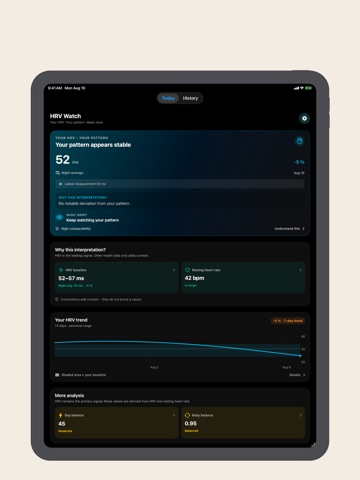
HRV Watch helps you genuinely understand heart rate variability. Instead of labeling every reading as “stress” or “recovery,” the app compares HRV with your personal baseline and shows when a meaningful pattern is developing. What is HRV? HRV describes your body’s ability to adapt the frequency of your heart rhythm to meet current demands. A healthy individual constantly adjusts their heart rhythm, reflecting resilience and adaptability. Regular tracking of HRV, RHR, and related metrics can provide useful context on stress and recovery trends. Key features: - A personal HRV baseline built from comparable days, not population cutoffs - Clear states: in your range, unusual, sustained change, or returning toward baseline - Nervous-system context from sleep, resting heart rate, respiratory rate, wrist temperature, and recent workouts when available in HealthKit - Calm Home Screen, Lock Screen, and Apple Watch widgets - Focused notifications with quiet hours, cooldowns, and immediate outliers off by default - Mindful and overnight views for more comparable measurement conditions Data Integration: The app seamlessly connects with Apple’s Health app to display your recorded data on: Apple Watch: A dedicated app and complication for quick insights. iPhone: A user-friendly interface to analyze trends and progress. How to Use: Compatibility: The app requires an Apple Watch Series 3 or later. Recording HRV Data: Use the Apple Breath App or other mindfulness apps to measure HRV values. Consistency Matters: For accurate trends, measure HRV, RHR, and Recovery Ratio consistently in similar conditions, such as "first thing in the morning" before starting your day. Best practice: do a short mindful session right after waking to collect a reliable HRV baseline and use the mindful/non-mindful filter to compare. This app utilizes advanced AI technology to provide context-aware coaching tailored to you. This app uses artificial intelligence with OpenAI to analyze your data. These metrics are informational trend tools and are not intended to diagnose medical conditions. Medical disclaimer: HRV Watch does not provide medical diagnosis or treatment. Always seek advice from a physician or other qualified healthcare professional in addition to using this app and before making medical decisions. Scientific references used in-app: - HRV standards: https://pubmed.ncbi.nlm.nih.gov/8598068/ - HRV review: https://www.ncbi.nlm.nih.gov/pmc/articles/PMC5624990/ - AHA heart rate guidance: https://www.heart.org/en/healthy-living/fitness/fitness-basics/target-heart-rates Terms and conditions: https://www.apple.com/legal/internet-services/itunes/dev/stdeula/
Latest release
What’s New
New in 3.0: a personal HRV baseline, nervous-system context, clear trend interpretation, calmer widgets, and focused notifications. This build also completes English localization across the app, Watch, widgets, notifications, and AI insights.
Audience growth
Ratings growth
Baseline captured. Growth appears after the crawler observes a changed rating count.
Momentum comes from crawler snapshots for the tracked storefront. “Viral growth signal” means unusually fast recent rating gains; it is an indicator, not download data.
Price tracking
Price intelligence
First snapshot captured. The trend line starts after the next crawler price observation.
- First observed Aug 27, 2026 · 12:48 AM Free
Screenshots