About this app
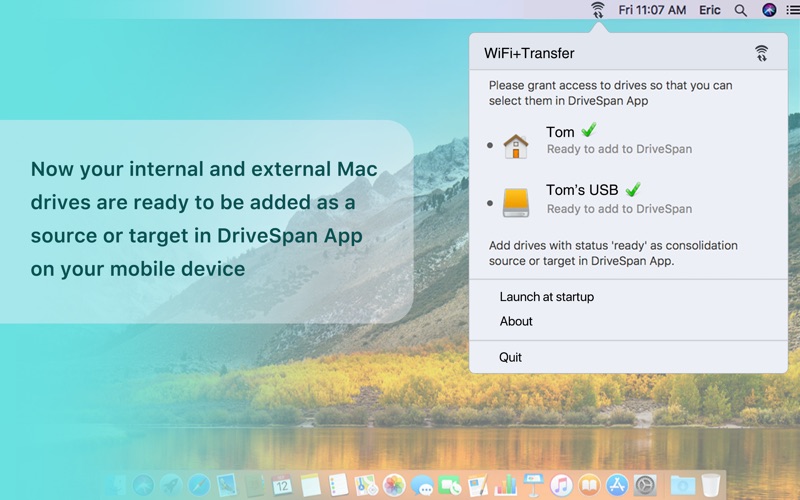
WiFi+Transfer is a free application for your Mac, which lets you grant access to internal and external drives of your Mac system in order to embed these into wireless consolidation with DriveSpan App on your mobile device. The key concept for consolidation via DriveSpan App is to copy all data from individual source drives to one central duplicate free target. In order to access your data in your Mac home folder as well as all the data on other drives in your Mac system, you need to grant access to your home folder and individual drives. This way WiFi+Transfer can connect to DriveSpan App and transfer data from internal or external Mac drives triggered by DriveSpan App. In a next step, DriveSpan will allow you to add the respective drive as a source or target for consolidation. When copying data from your Mac home folder or other sources to a dedicated consolidation target, WiFi+Transfer will make sure that your data are treated securely. If you granted access to your Mac home folder and other Mac drives, WiFi+Transfer will only read and transfer data from these locations. It will not modify any of the data in the source drive. For each consolidation, Drive Span will create a sub-folder in the selected target drive within the general folder 'DriveSpan'. This way also none of your existing data on your target drive will be modified. Any file inside of the selected drives will only be transmitted in the local network on your request in a secure way. Features - Use your Mac home folder/internal/external drives as source for consolidation in DriveSpan App - Use one of your Mac's internal/external drives as a target for consolidation in DriveSpan App - Execute and control consolidation wireless - Intuitive UI - Easy workflows to connect to DriveSpan App: 1. Grant access to your Mac home folder/internal/external Mac drives in WiFi+Transfer so that you can select these for consolidation via DriveSpan App 2. Add your Mac home folder/internal/external Mac drives for consolidation within DriveSpan App 3. Start consolidation in DriveSpan App Please note: WiFi+Transfer is a companion application to DriveSpan App. If you do not have DriveSpan App installed on your mobile device, you will not be able to benefit from the features provided by Wifi+Transfer. Please install DriveSpan App for your iOS device via the App Store: https://itunes.apple.com/us/app/drivespan/id1386688375?ls=1&mt=8
Latest release
What’s New
In this update, we have improved connection stability and fixed some bugs.
Audience growth
Ratings growth
Baseline captured. Growth appears after the crawler observes a changed rating count.
Momentum comes from crawler snapshots for the tracked storefront. “Viral growth signal” means unusually fast recent rating gains; it is an indicator, not download data.
Price tracking
Price intelligence
First snapshot captured. The trend line starts after the next crawler price observation.
- First observed Aug 26, 2026 · 9:42 AM Free
Screenshots