About this app
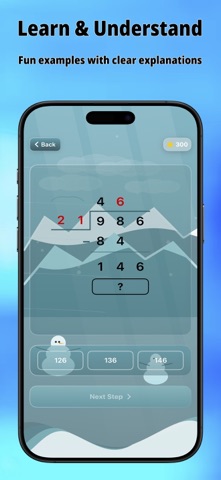
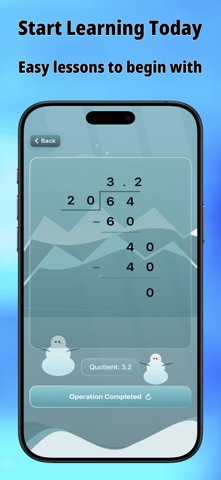
Learn Division – Step-by-Step Math Learning for Kids Transform your child’s math learning experience with our interactive division app! Designed especially for young learners, it makes mastering division fun, engaging, and easy to understand. Key Features: Step-by-Step Visual Learning • Watch numbers come to life through animated long division • Follow every step of the division process clearly • Perfect for visual learners who need to see the math happening Training & Challenge Modes • Test Yourself: Challenge yourself with problems, get step-by-step solutions, and learn from your mistakes. • Manual Mode: Enter your own numbers to practice the problems you want. • Random Mode: Get surprise division challenges to keep practice fun and engaging. Smart Learning Features • Supports numbers up to 999,999 to build strong math skills • Supports long division with remainders and long division with decimal results • Clear error guidance to help correct mistakes • Instant feedback to reinforce learning • Beautiful animations that make math exciting and enjoyable Customizable Experience • Adjustable animation speeds (slow, normal, fast, instant) • Multiple background themes for a personalized learning experience • Support for multiple number systems • Sound effects that can be turned on or off Child-Friendly Design • Clean, colorful interface designed for young users • Large, easy-to-tap buttons • Intuitive navigation children can master quickly • A distraction-free learning environment Perfect For: • Elementary students learning division • Parents teaching math at home • Teachers looking for engaging classroom tools • Kids who learn best through visual and interactive methods Whether your child is starting their math journey or needs more practice with division, our app provides the perfect learning companion. Download it now and watch your child’s confidence in math grow! From developers who care about high-quality education and making learning accessible to everyone.
Latest release
What’s New
Thank you for using our application. In the latest update, we have made several improvements, including: - A completely new layout - Enhanced animations - An improved quiz feature, also now available without the need to watch ads - New features added in the settings - Support for additional languages
Audience growth
Ratings growth
Baseline captured. Growth appears after the crawler observes a changed rating count.
Momentum comes from crawler snapshots for the tracked storefront. “Viral growth signal” means unusually fast recent rating gains; it is an indicator, not download data.
Price tracking
Price intelligence
First snapshot captured. The trend line starts after the next crawler price observation.
- First observed Aug 27, 2026 · 11:57 AM Free
Screenshots