About this app
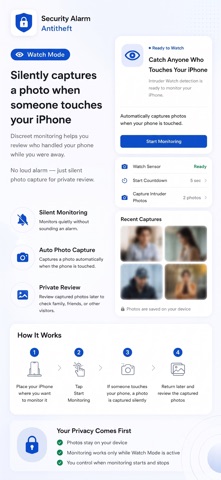
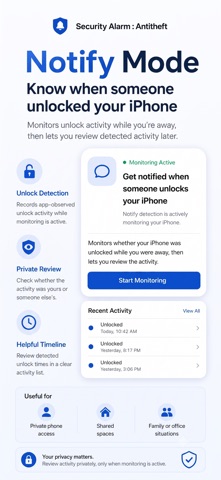
Best Security Alarm To Protect Your iPhone from your family members, friends and strangers trying to intrude into your phone privacy. “Security Alarm - AntiTheft” - Simply activate the Alarm and capture intruders Selfie, when your phone is touched or taken by intruder, you can catch nosey family, friends or strangers red handed! Using this App, you can protect your iPhone with “6” strong Modes: Smart Protection Modes 1. Motion Mode Place your iPhone on a stable surface and start monitoring. If unexpected movement is detected, the app can trigger an alarm to draw attention to the device. 2. Power Mode Monitor your charging connection and receive an alarm if the charging cable is disconnected while protection is active. Ideal for charging at work, in hotels, airports, cafés, or other shared spaces. 3. Audio Mode Protect your iPhone while headphones or supported audio accessories are connected. The app can alert you when the monitored audio connection is interrupted. 4. Pocket Mode Start monitoring before placing your iPhone in a pocket or bag. An alarm can sound when the device is removed, helping you react quickly in crowded or public places. 5. Silent Watch Mode Watch Mode provides discreet monitoring when you want to know who may have handled your iPhone. Silent monitoring without a loud alarm. When Watch Mode is active and the required monitoring screen remains open, the app can automatically capture photos after detected interaction. Review captured photos later in the private Intruder Gallery. 6. Notify Mode -Device unlock activity review Notify Mode records app-observed unlock activity while monitoring is active. When you return, review the detected time and confirm whether the activity was yours. This mode is useful when your iPhone may be accessible to family members, friends, coworkers, or other people in a shared environment. Customize your protection - Select your preferred alarm sound- 6 in app + from your device - Adjust alarm volume level - Turn vibration on or off - Alarm Sound On/Off - Set Protection Start Delay Time - as You Prefer - Adjust motion sensitivity - Choose the number of intruder photos will capture at event trigger - Configure each protection mode independently FEATURES: - Capture Intruders Selfie - Multiple Intruders Selfie, with Different Angles, Chance of Identify Intruders Increase - Share Intruders Photo among your Family and Friend Circle - View Break In Attempts by Intruder - Displayed On Icon - Passcode Lock with 4 Digit Pin Code - TouchID, FaceID Support to Stop Alarm - Reset or recover your app passcode - Auto Lock Maximum Volume Control. - Vibrates when Alarm Fire - Set On/Off - Accurate Motion-Sensing Algorithm. - Back up supported app data with iCloud Designed For Everyday Situations Security Alarm is useful when: - Leaving your iPhone on a desk - Charging in a public or shared location - Using headphones at the gym or while travelling - Carrying your phone in a pocket or bag - Monitoring access in a shared home or workplace - Checking whether someone handled your device while you were away Protect your iPhone with flexible monitoring, customizable alerts, discreet photo capture, and clear activity review—all in one modern security app. Use “Security Alarm - AntiTheft” app in iPhone when you are in crowded public place, in the shower, sleeping, or just away from your device, to trigger an alarm & capture a photo of intruder trying to peek into your phone. Important: Security Alarm is designed as an additional deterrent and monitoring tool. It cannot guarantee prevention of theft, unauthorized access, loss, or damage. Some features require the app to remain open and visible while monitoring is active. Availability may depend on device capabilities, permissions, and iOS limitations. Disclaimer : This app working in background mode, it will drain your battery so use it only when you need to protect your iPhone.
Latest release
What’s New
resolved crash issue.
Audience growth
Ratings growth
Baseline captured. Growth appears after the crawler observes a changed rating count.
Momentum comes from crawler snapshots for the tracked storefront. “Viral growth signal” means unusually fast recent rating gains; it is an indicator, not download data.
Price tracking
Price intelligence
- First observed Aug 21, 2026 · 6:43 PM Free
Screenshots