About this app
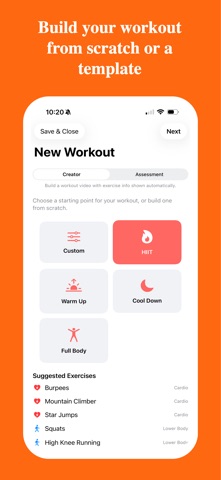
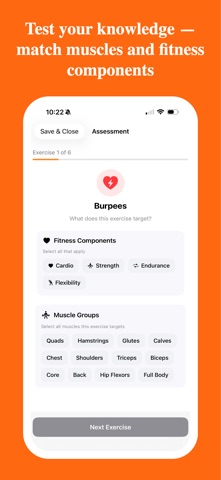
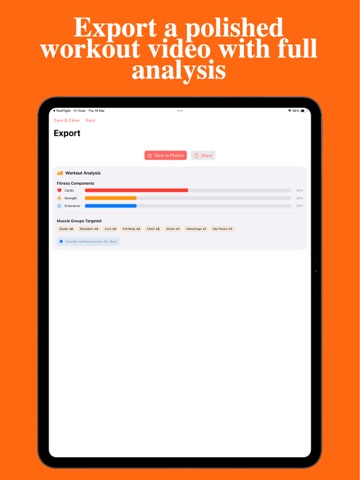
Turn your students into fitness creators. Workout Producer lets them build, record, and export their own professional workout videos — right from their iPhone or iPad. How it works: Pick exercises from the built-in library or add your own Set the duration for each exercise Record a demonstration of each move with the on-screen timer Choose background music from the included track library Export a polished workout video with exercise overlays Two modes — create and assess: Creator Mode builds the video with fitness information shown automatically. Each exercise displays its fitness components, target muscle groups, and coaching cues — students learn as they create. Assessment Mode puts understanding to the test. After recording, students must identify the fitness components and muscle groups for each exercise themselves. The app scores their answers and generates a detailed results breakdown — ready-made evidence of learning. Perfect for: PE classes and practical assessments Testing knowledge of muscular systems and fitness components Student-led warm-ups and cool-downs Personal training and fitness portfolios Features: Built-in exercise library across cardio, strength, flexibility, and more Fitness component and muscle group tagging for every exercise Assessment mode with instant scoring and feedback Coaching cues during recording Workout analysis summary with component breakdown Background music with volume controls Export in landscape, portrait, or square format Resume any workout in progress Plan it. Perform it. Prove you understand it.
Latest release
What’s New
Workout Producer 2.0 — completely rebuilt from the ground up in Swift. Brand new modern interface iPhone and iPad support Record, review, and re-record exercise clips Built-in background music library Export in landscape, portrait, or square format Resume workouts in progress Improved video composition and export quality This is a full rebuild of the original app with a fresh design and modern performance. Same concept, brand new experience.
Audience growth
Ratings growth
Baseline captured. Growth appears after the crawler observes a changed rating count.
Momentum comes from crawler snapshots for the tracked storefront. “Viral growth signal” means unusually fast recent rating gains; it is an indicator, not download data.
Price tracking
Price intelligence
First snapshot captured. The trend line starts after the next crawler price observation.
- First observed Sep 30, 2026 · 7:01 PM Free
Screenshots