About this app
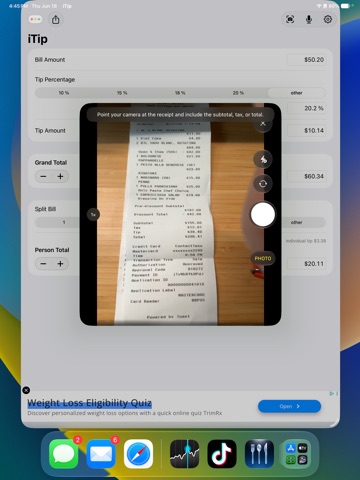
iTip makes it fast and easy to calculate the right tip, round totals the way you want, and split the bill with confidence. Whether you are dining out alone or with a group, iTip helps you quickly work out the tip amount, grand total, and per-person share using a simple, focused interface. New in iTip 3.1: • Improved receipt scanning with receipt/business name detection • Editable receipt names for cleaner saved data and PDF summaries • Item splitting for scanned receipts, so you can assign items to people • Improved voice entry with sample phrases, better error handling, and help when something goes wrong • Cleaner PDF receipt sections with fixed dark-mode text and tighter line-item spacing Features: • Calculate tips using preset percentages or any custom percentage • Use service quality mode for a more natural tipping experience • Round the grand total or per-person total up or down to the nearest dollar • Split the bill across multiple people • Optionally include tax fields and deduct tax from the bill before tipping • Adjust tip amount, grand total, tax, and per-person total directly • Scan receipts to capture bill values from a photo • Review scanned receipt amounts and choose subtotal, tax, or total • Edit the detected receipt name before applying scanned receipt data • Assign scanned receipt items to people for cleaner split reports • Share a summary of the calculation • Generate PDFs that include receipt details, receipt names, and split information • Use voice entry to update the bill, tip, split, and totals conversationally • Supports light mode, dark mode, and Dynamic Type • VoiceOver accessible On supported devices, voice features can use Apple Intelligence to help interpret natural language requests while iTip keeps control of the exact math. iTip is built to be quick, practical, and easy to use when you need the answer right now.
Latest release
What’s New
• Receipt Scan Scan a receipt, review the amounts, and apply subtotal, tax, or total. • Receipt Names iTip can detect the restaurant name and include it in receipt data and PDFs. • Item Splitting Assign scanned receipt items to people and generate a cleaner split report. • Voice Entry Improvements Use voice to update bill, tip, totals, and splits, with sample phrases and help when something goes wrong. • Added Signature Ending Optionally round your grand total to a familiar ending, like .11 or .34, so it is easier to recognize later on a card statement. • Bug Fixes
Audience growth
Ratings growth
Baseline captured. Growth appears after the crawler observes a changed rating count.
Momentum comes from crawler snapshots for the tracked storefront. “Viral growth signal” means unusually fast recent rating gains; it is an indicator, not download data.
Price tracking
Price intelligence
First snapshot captured. The trend line starts after the next crawler price observation.
- First observed Aug 27, 2026 · 8:33 AM Free
Screenshots