About this app
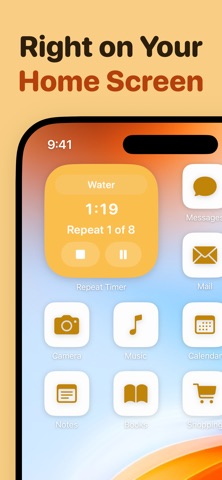
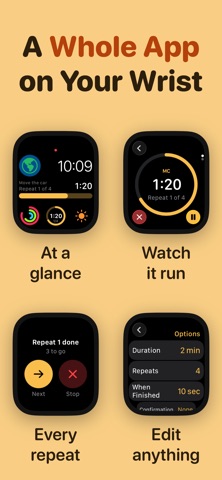
Set a duration, set how many times it repeats, and Repeat Timer counts you through it. Leave the app open to watch the countdown, or close it and get an alert on every repeat. THREE KINDS OF TIMER - Repeat: one duration, looped as many times as you like - Interval: different phases in sequence, each with its own length - Standard: a plain countdown NEW IN 4.0 - A brand new Apple Watch app, rebuilt from scratch. All three kinds of timer live on your watch, so you can start, pause and finish a session with your phone nowhere near you - Watch face complications with a live progress gauge - Lock Screen alarms that get through silent mode and a locked phone - Confirmation mode: the next repeat will not start until you acknowledge the last one, so nothing gets skipped while you are not looking - A full redesign for iOS 26, with a rounded typeface and haptics throughout FEATURES - Home Screen and Lock Screen widgets you can start, pause and skip without opening the app - A full screen timer for when you want nothing else on the display - Timer cards that flip over to reveal their settings - Siri and Shortcuts support - Notifications on every repeat, so you can get on with something else PERFECT FOR - Cooking, when something needs turning every few minutes - Standing up and stretching at work - Drinking water through the day - Focus blocks and pomodoro sessions, with planned breaks - Physiotherapy sets and holds - Watering plants for a set time each - Looking away from the screen every twenty minutes - Medication on a schedule Repeat Timer Premium Subscription Upgrade to access all features Payment will be charged to your Apple ID account at the confirmation of purchase. Subscription automatically renews unless it is canceled at least 24 hours before the end of the current period. Your account will be charged for renewal within 24 hours prior to the end of the current period. You can manage and cancel your subscriptions by going to your account settings on the App Store after purchase. Terms of Use: https://www.apple.com/legal/internet-services/itunes/dev/stdeula/
Latest release
What’s New
Repeat Timer 4.0. THREE KINDS OF TIMER Repeat, interval and standard timers now live side by side. Tap a timer card to flip it over and change its settings. A NEW APPLE WATCH APP Rebuilt from scratch. All three kinds of timer live on your watch, so you can start, pause and finish a session with your phone nowhere near you. Watch face complications show a live progress gauge. LOCK SCREEN ALARMS A repeat can now sound as a real alarm, so it gets through silent mode and a locked phone. CONFIRMATION MODE The next repeat will not start until you acknowledge the last one. Nothing gets skipped while you are not looking. WIDGETS THAT DO SOMETHING Start, pause and skip straight from the Home Screen or the Lock Screen. A NEW LOOK Redesigned for iOS 26, with a rounded typeface and haptics throughout. For feedback and suggestions don't hesitate to get in touch via the app Settings menu.
Audience growth
Ratings growth
Baseline captured. Growth appears after the crawler observes a changed rating count.
Momentum comes from crawler snapshots for the tracked storefront. “Viral growth signal” means unusually fast recent rating gains; it is an indicator, not download data.
Price tracking
Price intelligence
- First observed Oct 8, 2026 · 1:27 PM Free
Screenshots