About this app
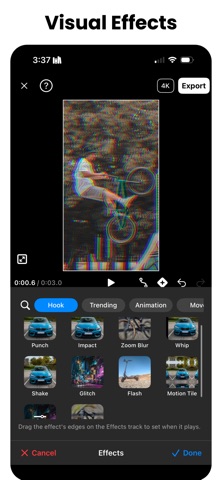
Stabilize shaky video: lock a car, scooter or mountain bike dead still in frame, parked at a meet or flat out on the road. Then ramp the speed on a curve, boost it to 240FPS for real slow motion, and finish with true optical-flow motion blur. Motion Track is a full video editor built around motion — stabilization, tracking, speed, effects, text and color — and now a photo editor too. All on-device. Your videos never leave your phone. STABILIZE - Anti-Shake — smooth out handheld shake in one tap, at a strength you can change any time. Never baked in, so quality survives - Track Feature — tap any point on a car, scooter, bike or board and pin it dead still in frame. It picks the spot for you: open it, tap Track - Track 2 Points for position, rotation and scale, plus Manual Keyframes - Zoom to Fill — stabilizing can leave black edges; one tap crops them away EFFECTS - Effects on a draggable lane — Shake, Punch, Whip, Impact, Glitch, RGB Split, VHS, Zoom Blur, Motion Tile and more, led by a Hook shelf of the ones that land inside half a second - Every effect has dials, and every dial takes keyframes - Animation for the start and end of a clip, and Body Glow and Outline that follow the person in frame PHOTO EDITOR - Edit Photo opens a still in the same editor — the filters, color wheels, curves, masks and Remove Background you use on video - Crop, straighten, rotate, flip, aspect ratios and backgrounds - Text stays sharp at the photo's own resolution - Export at full resolution, or save a cutout as a transparent PNG TEXT & CAPTIONS - Presets across Basic, Caption, Bold, Neon, Retro and Cute, drawn over your own video as you type, not on a black screen - A Styles tab for background, stroke, glow and shadow, each with its own dials - Animations in and out: Fade, Pop, Slide, Zoom, Spin and Typewriter - Attach text, emoji, stickers and images to a moving subject and they follow it SPEED & SLOW MOTION - Speed Ramps on a Graph — every beat has Bezier handles, like After Effects - Boost FPS — rebuild a clip at 60, 120 or 240FPS with AI frame interpolation - Motion Blur — a true long-exposure look built on optical flow, so a turning bike smears RIDE, DRIVE & HELMET CAM - Helmet and handlebar footage is the hardest to hold steady — stabilize it with no re-encode - Blur License Plates and Cover My Face — post street footage without doxxing anyone - Mirror a flipped front-camera take, and cut 9:16 for Reels, Shorts and TikTok out of a 16:9 action cam LAYERS & OVERLAYS - Video Overlays — a face cam over your POV shot, b-roll over the edit, with its own audio - Remove BG — cut a background out on every frame, automatically or by brush - Replace — swap a clip's footage and keep the edit around it: trim, look, effects, music FILTERS & COLOR - 72 Filters on six shelves — cinematic, portrait, vlog, film, B&W and car - Masking — brighten, cool or darken only what a mask covers - Color Wheels, RGB & HSL Curves, Sharpen, Vignette, Grain, .cube LUTs and Log Conversion for Apple Log, Sony and DJI MUSIC & TIMELINE - Beats Panel — add music and mark the beats by ear, or auto-detect them - Magnetic Timeline — drag a clip edge, effect or overlay and it snaps to a beat - Trim, split, reorder, transitions, fades and 16 easing curves CAMERA - Shoot in the app: lens chips, pinch zoom, tap to focus, exposure, torch, countdown, four stabilization modes and multi-take, plus Dual Camera and Reaction Cam ALSO INSIDE - Auto-Track a Person, Blur Others, Green Screen, and an AI Enhancer that upscales to 4K - Free Up Space — clear the duplicates and huge videos eating your storage Car meet reel, scooter POV, MTB trail run, sports edit or dance fancam — one app, fast enough to post today. DISCLAIMERS - All features can be tried for free - Exporting with PRO features requires a subscription - Boost FPS requires iOS 26 CONTACT team@morningavocado.com TERMS OF USE https://www.apple.com/legal/internet-services/itunes/dev/stdeula/
Latest release
What’s New
Edit Photo. The editor now opens a still, not just a clip. The same 72 filters, color wheels, RGB and HSL curves, masks and Remove Background you use on video, on one picture — plus crop, straighten, rotate, aspect ratios and backgrounds. Text stays sharp at the photo's own resolution, a cutout can save as a transparent PNG, and the export goes out at full resolution. Text gets a Styles tab. Background, stroke, glow and shadow each get their own dials, and glow and shadow are independent now — so lettering can be neon and lift off the video at the same time. The composer previews on your actual footage instead of a dimmed copy of it. Also new since 6.23, if you skipped last week's update: - Effects, rebuilt — the lane went from eight of them to forty-one: Punch, Whip, Impact, Glitch, RGB Split, VHS, Motion Tile, Body Glow, each on a draggable range with its own dials, and every dial takes keyframes - A rebuilt Text tool: a preset gallery on six shelves, in-and-out animations, and a caption bar measured against the one you already use - Anti-Shake is the new name for the one-tap shake smoother. "Stabilize" is what everyone already calls Track Feature, and pointing both at the same word was sending people to the wrong tool - A new camera: lens chips, pinch zoom, tap to focus, exposure, torch, countdown, multi-take, and stabilization modes named for what they cost you - Bug fixes and performance improvements Everything runs on-device. Your videos never leave your phone.
Audience growth
Ratings growth
Baseline captured. Growth appears after the crawler observes a changed rating count.
Momentum comes from crawler snapshots for the tracked storefront. “Viral growth signal” means unusually fast recent rating gains; it is an indicator, not download data.
Price tracking
Price intelligence
First snapshot captured. The trend line starts after the next crawler price observation.
- First observed Aug 27, 2026 · 4:48 AM Free
Screenshots