About this app
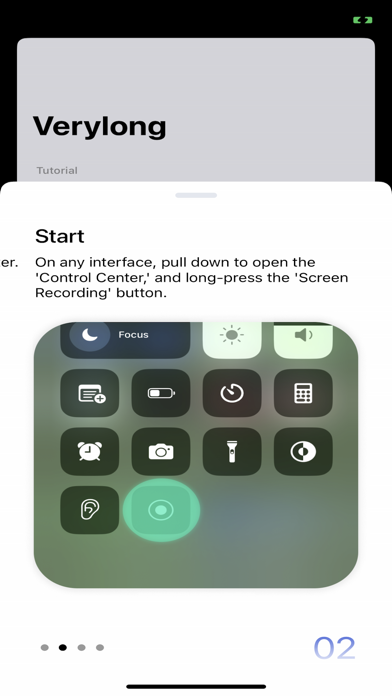
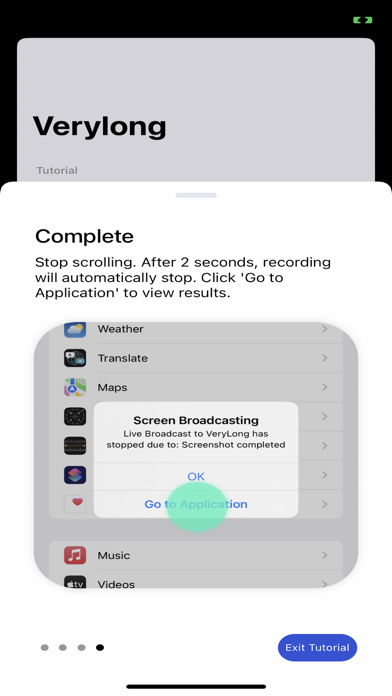
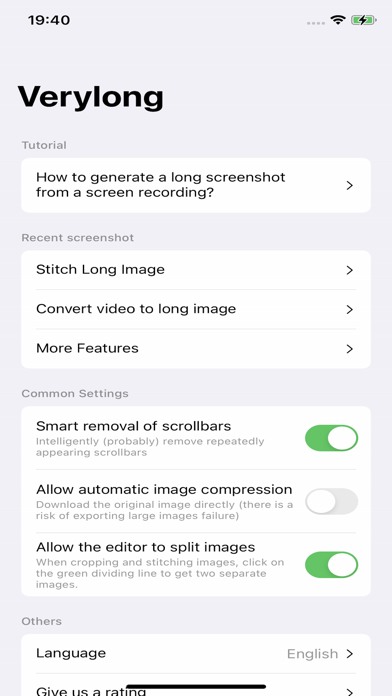
With this software, you can easily capture content that extends beyond a single screen. Here are the simple steps: **Preparation:** OPEN Settings; select Control Center; ensure the Screen Recording option has been added: **Steps:** 1. Prepare the content you want to capture, ensuring that dynamically loaded content is fully loaded. 2. Pull down the control center, long-press the screen recording button. 3. Choose the "Verylong" option, then click on start recording. 4. Return to the content page you want to capture before the countdown ends. 5. When the recording button is illuminated, start scrolling through the page. 6. Lift your finger from the screen at the desired endpoint for recording and wait for 3 seconds. 7. After 3 seconds, a pop-up window will appear, click on "Go to the app." Congratulations, you have completed the screenshot operation! User Agreement:https://metal-basin-5f3.notion.site/Pro-Verylong-Terms-of-Use-7adc43bede7846f9996541e8def24566?pvs=4 Privacy Policy: https://metal-basin-5f3.notion.site/Pro-Very-long-Privacy-Policy-c43443aaa77049f5a33bf97a985f0bdf?pvs=4
Latest release
What’s New
The app with the green logo is also developed by us. If you're interested in this app, you can try the green version first. However, please note that the green version is a special edition designed for Chinese language users, so support for other languages may be limited. This update includes the following improvements: * Fixed an issue where the selected image order for Smart Stitching did not match the actual stitching sequence. * Added an orange guideline to indicate positions where Smart Stitching cannot detect stitching points.
Audience growth
Ratings growth
Baseline captured. Growth appears after the crawler observes a changed rating count.
Momentum comes from crawler snapshots for the tracked storefront. “Viral growth signal” means unusually fast recent rating gains; it is an indicator, not download data.
Price tracking
Price intelligence
- First observed Sep 29, 2026 · 2:59 AM $6.99
Screenshots