About this app
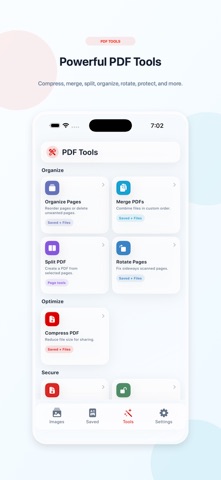
Image to PDF: Scanner & Tools helps you turn photos and scanned documents into clean, organized PDF files in seconds. Create PDFs from images, scan documents with the camera, manage saved files, and use powerful PDF tools in one simple app. Key Features: • Convert images to PDF Select photos from your library or scan with the camera, then create a polished PDF file. • Document scanner Capture documents using the camera and turn them into clear PDF pages. • PDF presets Choose the best output style for your needs, including document-friendly, small file, print quality, and email-friendly options. • Saved PDF library Keep your PDFs organized, preview them, rename them, share them, sort them, filter them, or delete files you no longer need. • Compress PDF Reduce PDF file size for easier sharing. • Merge PDFs Combine multiple PDF files into one document. • Split PDFs Extract selected pages into a new PDF. • Organize pages Reorder or delete pages from a PDF. • Rotate pages Fix scanned pages that are sideways or upside down. • Sign PDF Add your signature to PDF files. • Watermark PDF Add text or logo watermarks to your documents. • Annotate PDF Add text, stamps, arrows, highlights, shapes, blur, and other useful markups. • Protect PDF Add a password to secure your document. • Remove password Unlock protected PDFs when you know the current password. • Export pages as images Convert PDF pages into high-quality images for saving or sharing. Image to PDF: Scanner & Tools is designed for everyday document work, including receipts, notes, forms, contracts, study pages, work files, and scanned papers.
Latest release
What’s New
New in this version: - Added powerful PDF tools: Compress, Merge, Split, Organize Pages, Rotate Pages, Sign, Watermark, Annotate, Protect PDF, Remove Password, and Export Pages as Images. - Improved document scanning and image-to-PDF workflow. - Redesigned Home, Saved, Tools, and Settings screens for a cleaner experience. - Added PDF presets for documents, small files, printing, and email sharing. - Improved Saved PDFs library with better sorting, filtering, search, and file actions. - Improved result screens after creating or editing PDFs. - General performance, stability, and UI improvements.
Audience growth
Ratings growth
Baseline captured. Growth appears after the crawler observes a changed rating count.
Momentum comes from crawler snapshots for the tracked storefront. “Viral growth signal” means unusually fast recent rating gains; it is an indicator, not download data.
Price tracking
Price intelligence
First snapshot captured. The trend line starts after the next crawler price observation.
- First observed Sep 4, 2026 · 3:31 AM Free
Screenshots