About this app
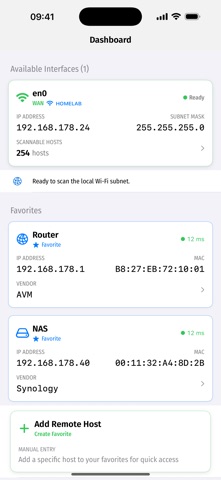
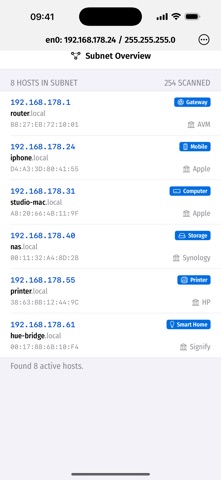
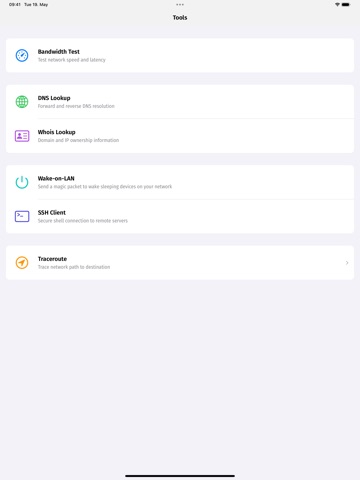
Network Lab is a privacy-first LAN scanner and network toolbox for iPhone, iPad and Apple silicon Mac. Use it to discover devices on your Wi-Fi or wired network, inspect Bonjour and Zeroconf services, monitor favourite hosts and troubleshoot common connectivity problems without creating an account or uploading scan data to a cloud service. What Network Lab helps with: - Scan your local subnet and identify active hosts - Browse Bonjour / Zeroconf services and service records - Inspect IP addresses, MAC addresses, vendors, ports and host details where available - Save network snapshots, compare scans and export results as CSV - Monitor favourite hosts for reachability - Run ping, traceroute, DNS lookup, whois and bandwidth tests - Send Wake-on-LAN magic packets to sleeping devices - Open SSH sessions to known hosts Network Lab is built for home labs, small offices, developers, admins and curious users who want a clear view of their own network. The core LAN scanner stays available for free, while Pro unlocks the extended diagnostic tools.
Latest release
What’s New
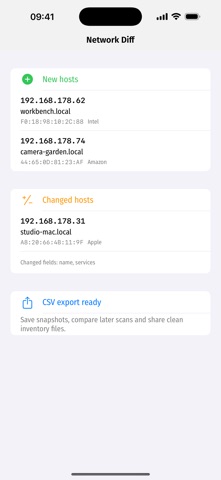
Network Lab 1.1 is a larger release focused on making local network diagnostics clearer, more useful and easier to trust. New in this version: - Wake-on-LAN for sending magic packets to sleeping devices - DNS record lookup improvements for deeper troubleshooting - Network snapshots, diff view and CSV export for scan results - A refreshed app icon and stronger visual branding - A polished first-run and splash experience - Clearer Pro messaging with the core LAN scanner kept free - More German and English UI localisation - Improved optional LANAgent MAC address enrichment when a LANAgent is present on the local network Network Lab still keeps diagnostics local: no account, no ads and no cloud collection of your network scan data.
Audience growth
Ratings growth
Baseline captured. Growth appears after the crawler observes a changed rating count.
Momentum comes from crawler snapshots for the tracked storefront. “Viral growth signal” means unusually fast recent rating gains; it is an indicator, not download data.
Price tracking
Price intelligence
First snapshot captured. The trend line starts after the next crawler price observation.
- First observed Oct 7, 2026 · 12:22 AM Free
Screenshots