About this app
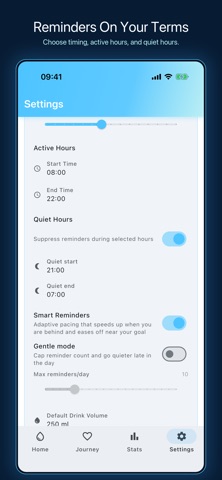
Water Tracker is the smart hydration app that helps you beat thirst and drink enough water every day. Track intake across 10+ liquid types, support your diet and wellness goals, and sync seamlessly with Apple Health. SMART DAILY GOALS - Personalized targets based on your weight (scientifically calculated) - Weather-adaptive goals using local climate data — hotter days mean higher targets - Workout-aware adjustments with science-backed sweat rate formulas - Quick-add buttons for your favorite container sizes SCIENCE-BACKED BEVERAGE TRACKING - Log water, coffee, tea, juice, milk, sports drinks, soda, and more - Accurate hydration effectiveness values — not all drinks are equal - Custom liquid creator (premium) for your favorite beverages - Track the real hydration impact of every drink you log FITNESS & HEALTH INTEGRATION - Seamless Apple Health sync — workout and hydration data in one place - Post-workout rehydration calculator with intensity-based recommendations - Environmental adjustments for temperature, humidity, and altitude - Daily intake history with edit and delete capabilities GAMIFIED HEALTH JOURNEY - 18+ achievements with confetti celebrations when you reach milestones - 30-day transformation timeline with visual progress tracking - Daily, weekly, and monthly streak tracking to keep you motivated - Progress insights reveal your hydration patterns over time SMART REMINDERS - Customizable notification intervals (30 min, 1 hr, 2 hr, 3 hr) - Quiet hours support so you sleep without interruption - Deep links for one-tap quick-add directly from notifications - Adaptive pacing learns from your drinking habits HOME SCREEN WIDGETS - iOS WidgetKit support with real-time progress display - One-tap quick-add without ever opening the app - Multiple widget sizes to fit your home screen layout - Instant sync between widget and app ADVANCED STATISTICS (Premium) - Weekly and monthly charts with trend analysis - Hydration insights reveal your best and worst days - Full intake history with detailed breakdown by liquid type - Export data to CSV or JSON for backup BEAUTIFUL THEMES - 6 stunning color themes: Classic Blue, Ocean Deep, Forest Green, Sunset Orange, Lavender Dreams, Fresh Mint - Dark mode support for comfortable night viewing - Platform-native design with Cupertino styling on iOS APPLE WATCH (Premium) - See today's hydration ring at a glance on your wrist - Log water with one tap, no phone needed - Stays in sync with your iPhone, in your language GLOBAL SUPPORT - 11 languages: English, Spanish, French, Russian, Simplified & Traditional Chinese, Portuguese, German, Japanese, Korean, Hindi - Metric and imperial units (ml/oz, kg/lbs) PREMIUM FEATURES - Advanced statistics and insights dashboard - 5 premium color themes - Custom liquid creator (up to 10 beverages) - Extended achievement system - Lifetime access with a one-time purchase PRIVACY FIRST - All data stored locally on your device - No account required, no personal data collected - Optional Apple Health integration (you control permissions) - No ads PERFECT FOR - Athletes tracking post-workout hydration needs - Health-conscious individuals monitoring daily water intake - Tea and coffee lovers who need accurate hydration calculations - Anyone building better hydration habits Join thousands of users who have transformed their hydration habits. Download Water Tracker today and drink smarter! --- Privacy Policy: https://water-tracker.app/privacy Terms of Use: https://water-tracker.app/terms Support: contacts@trifoiltrailblazer.com
Latest release
What’s New
4.2.1 is a small polish release. • Reliability improvements and small fixes under the hood • The app now picks better moments to ask for your feedback Stay hydrated!
Audience growth
Ratings growth
Baseline captured. Growth appears after the crawler observes a changed rating count.
Momentum comes from crawler snapshots for the tracked storefront. “Viral growth signal” means unusually fast recent rating gains; it is an indicator, not download data.
Price tracking
Price intelligence
First snapshot captured. The trend line starts after the next crawler price observation.
- First observed Sep 14, 2026 · 1:03 AM Free
Screenshots