About this app
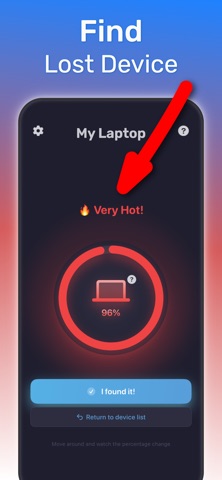
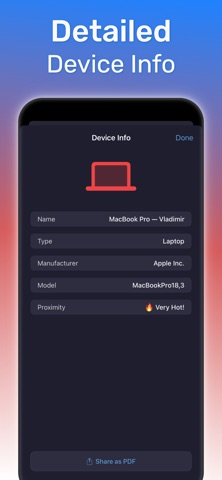
Find Bluetooth Device – Bluetooth scanner and proximity finder Find Bluetooth Device is an iOS app for iPhone that helps you locate nearby lost Bluetooth gear. Use this app as a Bluetooth scanner and finder when you need to recover AirPods, earbuds, headphones, smartwatches, speakers, fitness trackers and other powered-on accessories in range. If you misplace a device at home, at work, in your car or on public transport, Find Bluetooth Device scans nearby Bluetooth signals and shows a clear list with signal strength. Pick the device you want, then follow hot–cold proximity guidance and a percentage indicator so you walk toward it instead of searching blindly. What you can do with Find Bluetooth Device - Scan for nearby Bluetooth devices and see them in a clear list - View signal strength for each device to understand how close it is - Follow hot–cold style guidance that intensifies as you move closer - Track proximity with a percentage indicator so you know when you are almost there - See device details like name, manufacturer and model when available - Use the app in homes, offices, gyms, cars, trains or other indoor spaces How Find Bluetooth Device works 1. Open Find Bluetooth Device on your iPhone. 2. Start a scan to discover nearby Bluetooth devices. 3. Select the device you want to find from the list. 4. Move around while watching the proximity percentage and hot–cold indicator. 5. As the signal gets hotter and the percentage rises, you are getting closer. Who Find Bluetooth Device is for - AirPods and earbud owners who need to find lost earbuds quickly - Headphone users who misplace wireless headphones at home or at work - Smartwatch and fitness tracker users who need a simple proximity tracker - Anyone who wants a reliable Bluetooth device finder without complex setup Use cases for Find Bluetooth Device - Find lost AirPods or a single earbud in a room, bag or car - Locate wireless headphones on a desk, sofa or in clutter - Track down a smartwatch, band or fitness tracker at home or in the gym - Search for Bluetooth speakers or other small gadgets indoors Privacy and pricing Find Bluetooth Device focuses on nearby Bluetooth discovery and proximity tracking using signal strength on your device. For details on data handling and subscriptions, see the Terms of Use and Privacy Policy below. Download Find Bluetooth Device today to turn stressful searching into a simple, guided process. Terms of Use: https://bluetoothfinderapp.com/terms.html Privacy Policy: https://bluetoothfinderapp.com/privacy.html
Latest release
What’s New
This version of Find Bluetooth Device includes small minor fixes
Audience growth
Ratings growth
Baseline captured. Growth appears after the crawler observes a changed rating count.
Momentum comes from crawler snapshots for the tracked storefront. “Viral growth signal” means unusually fast recent rating gains; it is an indicator, not download data.
Price tracking
Price intelligence
First snapshot captured. The trend line starts after the next crawler price observation.
- First observed Aug 26, 2026 · 3:53 AM Free
Screenshots