About this app
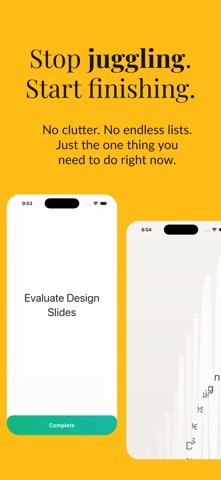
To-do lists are digital hoarding. They grow, they clutter, and they carry a weight of "what's next" that kills "what's now." You don’t need another place to list twenty things you might do. You need a tool to make you do the one thing that matters. Meet The One. This is an anti-task manager. It’s a minimalist focus engine designed for the days when your list is too long and your attention is too thin. We don’t help you manage your debt; we help you clear it. The Ritual: 01. COMMIT Type your messy thought. Our silent AI acts as your editor, stripping away the noise and refining your intent into a punchy, 3-word objective. 02. LOCK IN Once you commit, there is no going back. The task takes over. It stays on your screen, on your wrist (Apple Watch), and in your mind. You cannot swipe it away. You cannot add a second task. You have to finish it to free your phone. 03. SHRED The release. When the work is done, you don’t just tick a box. You physically disintegrate the task with a heavy haptic thud. It feels as good as it looks. Why use The One? Kill Cognitive Debt: Stop carrying the mental load of "later." Intentional Friction: We made it hard to add tasks, so you only add what matters. Zero Setup: No projects, no tags, no folders. Just open and work. Privacy First: Your focus is yours. Data stays on your device and private iCloud. Designed for single-task focus. Built to get things done. Do one thing today. Just one.
Latest release
What’s New
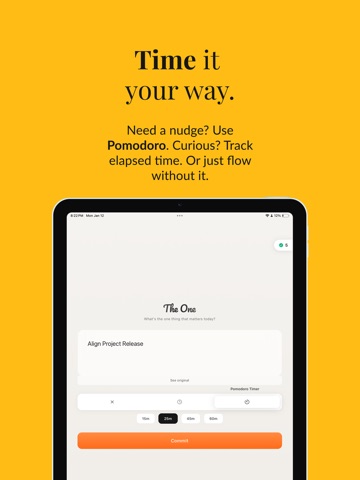
New Tab Navigation TheOne now features a clean bottom tab bar with three tabs — Focus, History, and Settings. Navigate effortlessly between your task, past completions, and preferences. On iOS 26, the tab bar uses Apple's native Liquid Glass design. Dedicated Settings Screen Control your experience with easy toggles for sound effects and daily reminders. Export your completed tasks as a CSV file, all from one place. Full-Screen History Your completed tasks now have their own dedicated tab with streak tracking and a scrollable list — no more hidden gestures to find your history. Simplified Pomodoro Timer Choose from 15, 25, 45, or 60-minute presets with a clean pill selector.
Audience growth
Ratings growth
Baseline captured. Growth appears after the crawler observes a changed rating count.
Momentum comes from crawler snapshots for the tracked storefront. “Viral growth signal” means unusually fast recent rating gains; it is an indicator, not download data.
Price tracking
Price intelligence
First snapshot captured. The trend line starts after the next crawler price observation.
- First observed Aug 20, 2026 · 6:54 PM Free
Screenshots