About this app
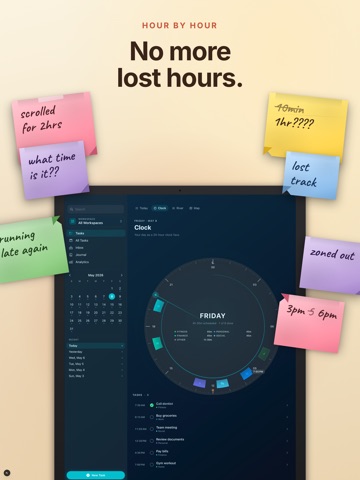
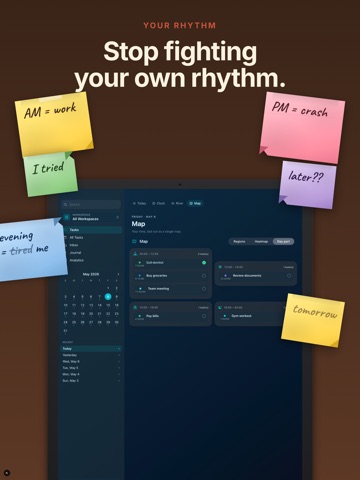
Plan the day. Hold it lightly. Reflect on how it felt. Taskful Day is a calm planner that shows your hours four ways — a clean list, a 24-hour clock, a river of energy, a map of where time went. No red overdue. No shame charts. Just a quiet place to think about today. iPhone, iPad, Apple Watch and Mac. Designed in the open. Yours, on your device. A DAY YOU CAN ACTUALLY READ • List — the editorial canvas. Time-sorted, not priority-shuffled. • Clock — your day on a 24-hour face. See gaps you didn't know you had. • River — tasks plotted by energy and category. Tides of focus, visible. • Map — your time laid out as a single composition. CAPTURE BEFORE THE THOUGHT ESCAPES Ask Siri. Tap the Control Center button. Raise your wrist. Or just type — the parser reads "call dentist tomorrow at 2" in eight languages and never sends a syllable to a server. BLOCK OUT THE HOURS Drag tasks onto a week-by-hour grid and watch the day take shape. Move a block and the time moves with it. For the days that need a plan, not just a list. ON YOUR WRIST Capture by voice, triage your inbox, tick off the one thing that matters, and glance at complications showing what's next — without reaching for your phone. WIDGETS AND GLANCES Seventeen widgets across every size, plus Lock Screen and Apple Watch complications. Start a focus session and follow the countdown from the Dynamic Island. GUILT-FREE ROLLOVER Tasks you didn't finish move forward. No flashing red. No overdue badge. No analytics card titled "what you failed to do." You decide whether each one comes with you, or stays where it was. MOOD AS A FIRST-CLASS SIGNAL The Journal isn't a separate room. Mood entries quietly feed Analytics — "your Wednesdays have felt the steadiest", "the calmer days were also your most complete." Reflection becomes pattern, not pressure. SHORTCUTS AND AUTOMATION App Shortcuts for adding a task, completing one, and asking what's next. Drop Taskful Day into any automation you already run. WHAT'S INCLUDED The editorial list, voice capture, the Journal and the Inbox, with a task allowance to get you started — no account, no card. Pro adds the Clock, River and Map, the time-block grid, Focus Orbit, full multi-period analytics, every theme, multiple workspaces, and unlimited tasks and check-ins. Every new install begins with 7 days of Pro. No card, no auto-renew. PRIVACY, NOT JUST IN THE PRIVACY POLICY No analytics SDKs. No third-party login. Data lives on your device by default; opt into iCloud sync only if you want it. Voice capture, language parsing and mood analysis all happen on device. BUILT FOR EACH SCREEN The iPad isn't a stretched iPhone. Sidebar, mini-calendar, hover states, keyboard shortcuts and a full-screen task canvas — and on Mac, a real Mac app with menu-bar commands. A planner is just a place to think clearly. We hope this is one. Subscriptions auto-renew at the price shown until cancelled. Manage in App Store › Account › Subscriptions. Lifetime is a one-time purchase. Terms of Use: https://www.apple.com/legal/internet-services/itunes/dev/stdeula/
Latest release
What’s New
Sharper capture, and a watch that keeps up. Titles that read like titles Say "call dentist tomorrow at 2pm" and the task is called "Call dentist" — the date and time move where they belong instead of sitting in the name. Fixed across all eight parsing languages. Parsing that listens more carefully "Not urgent" no longer arrives marked urgent. Words like Morning and Important stay in your titles when you meant them as words. And a task given a day but no time no longer picks one up on its way in. Apple Watch during your trial Your watch now unlocks with the rest of the app for the full seven days, instead of waiting until you subscribe. A clearer free plan Settings now shows how much of your free allowance you've used, so nothing arrives as a surprise. Have a moment? A quick review helps others find Taskful Day.
Audience growth
Ratings growth
Baseline captured. Growth appears after the crawler observes a changed rating count.
Momentum comes from crawler snapshots for the tracked storefront. “Viral growth signal” means unusually fast recent rating gains; it is an indicator, not download data.
Price tracking
Price intelligence
First snapshot captured. The trend line starts after the next crawler price observation.
- First observed Sep 11, 2026 · 7:57 AM Free
Screenshots