About this app
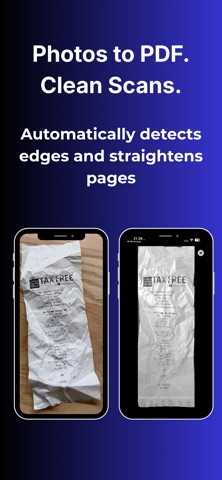
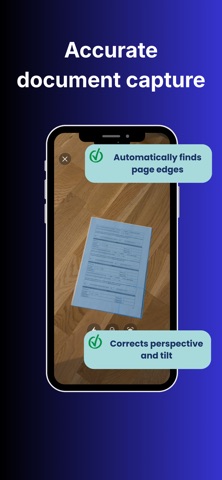
Photos to PDF – Scan & Convert A fast and simple way to convert photos and images into PDF documents on your iPhone. Photos to PDF – Scan & Convert helps you scan documents, capture multiple pages, and convert images to PDF directly on your device. Everything works offline, so your documents stay private and under your control. Whether you are converting photos to PDF, turning JPG images into PDFs, or scanning paperwork on the go, the app is designed to get the job done quickly without unnecessary steps. Convert Photos to PDF Instantly Select photos from your library or use the built-in scanner to create PDF documents in seconds. No uploads, no waiting, and no account required. Built-In Document Scanner Use your camera to scan receipts, contracts, notes, IDs, whiteboards, and more. The scanner detects edges, corrects perspective, and enhances image quality to create clear, readable PDFs. Batch Image to PDF Conversion Convert multiple images to PDF at once and combine them into a single multi-page document. Ideal for reports, forms, portfolios, and document archives. Edit Before You Convert Fine-tune your pages before exporting. Rotate pages, reorder them with drag and drop, apply filters, and preview your PDF before saving. Key Features Convert photos to PDF quickly Image to PDF and JPG to PDF support Multi-page PDF creation Document scanning with edge detection Perspective correction and image enhancement Page reordering, rotation, and deletion Preview PDFs before export Share or save to the Files app Document history for quick access Works fully offline Supports Light and Dark Mode Privacy First All document processing happens on your device. Your photos and PDFs are never uploaded, tracked, or shared. No cloud processing and no account required. Free Trial and Subscription Try the app with a free trial on eligible plans. After the trial, subscribe to continue creating unlimited PDFs. Subscriptions renew automatically unless cancelled. Photo to PDF – Scan & Convert Fast, private, and built for everyday document conversion. https://www.appharbour.com/phototopdf/support.html https://www.appharbour.com/phototopdf/terms.html https://www.appharbour.com/phototopdf/privacy.html
Audience growth
Ratings growth
Baseline captured. Growth appears after the crawler observes a changed rating count.
Momentum comes from crawler snapshots for the tracked storefront. “Viral growth signal” means unusually fast recent rating gains; it is an indicator, not download data.
Price tracking
Price intelligence
First snapshot captured. The trend line starts after the next crawler price observation.
- First observed Aug 21, 2026 · 2:48 AM Free
Screenshots