About this app
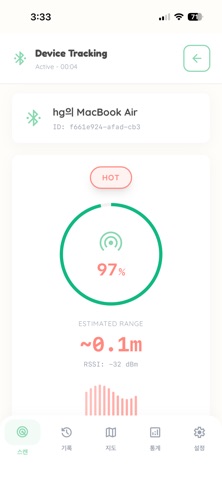
Lost It? Find It with SearchBom. Don't panic when you can't find your Bluetooth devices. Whether it's your wireless headphones, smartwatch, fitness tracker, or even a Bluetooth tag attached to your keys, SearchBom helps you track them down quickly and accurately. SearchBom turns your phone into a powerful BLE (Bluetooth Low Energy) scanner. We focus on what matters most: data accuracy and finding your lost items fast. No gamification, no distractions, just a professional-grade tool for recovering what's yours. KEY FEATURES: Real-Time Radar & Distance Tracker Visualize the signal strength of nearby devices. The closer you get, the stronger the signal bar grows. Our smart algorithm estimates the distance to your lost item in real-time, guiding you right to it. Powerful Device Scanner Detects all BLE devices around you. Filter by specific device types or names to focus on exactly what you're looking for. Supports a wide range of devices including: * Wireless Earbuds & Headphones * Smartwatches & Fitness Bands * Bluetooth Trackers & Tags * Tablets & Phones using BLE Detailed Technical Insights For engineers and tech enthusiasts, we provide deep insights into every signal. View raw RSSI (Received Signal Strength Indicator) values, UUIDs, advertising data, and manufacturer information. It’s not just a finder; it’s a debugger. Fast & Lightweight Designed for speed. The app launches instantly and starts scanning immediately. The clean, modern interface ensures you don't waste a second when searching for your precious items. EASY TO USE: 1. Scan: Open the app to see a list of all Bluetooth devices nearby. 2. Track: Select your lost device from the list. 3. Find: Watch the signal strength meter and estimated distance. Move around until the signal gets stronger! SearchBom is your reliable partner for finding lost tech. Download now and never lose track of your devices again.
Latest release
What’s New
- App Information modify
Audience growth
Ratings growth
Baseline captured. Growth appears after the crawler observes a changed rating count.
Momentum comes from crawler snapshots for the tracked storefront. “Viral growth signal” means unusually fast recent rating gains; it is an indicator, not download data.
Price tracking
Price intelligence
First snapshot captured. The trend line starts after the next crawler price observation.
- First observed Sep 7, 2026 · 2:31 PM Free
Screenshots