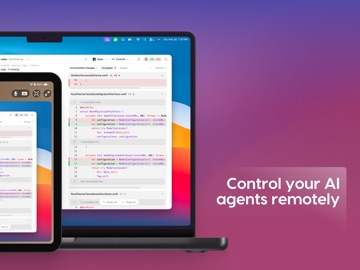
About this app
Access and control your Mac from anywhere. Workbench is a high-performance remote desktop that lets you connect to your Mac from your iPhone or iPad. Manage your machine, run desktop apps, and check in on long-running tasks while away from your desk. Built by the team behind Astropad Studio and Luna Display, Workbench delivers fast, responsive control with crisp visual and reliable performance across all networks. ————— KEY FEATURES Fast, high-fidelity streamlining. Interact with your Mac in real time with responsive controls and sharp visuals. Voice input. Dictate text from your iPhone or iPad and send it directly to your Mac. Unified display. Consolidate multi-display setups into a single workspace that conforms to the resolution of your mobile device. Apple Pencil support. Use your Apple Pencil like a mouse for precise cursor control when interacting with Mac apps. No-hassle connections. Connect instantly without complicated router/network configurations, port forwarding, or manual setup. Secure by design. Astropad doesn’t capture your screen or track your activity, and sessions are secured by modern end-to-end encryption standards. ————— BUILT FOR REMOTE WORKFLOWS Workbench makes it easy to stay connected to your Mac wherever you are. Monitor running processes, access files, manage remote systems, or check in on tools and software that doesn’t have a mobile app. ————— PRICING Workbench includes a Free plan with 30 minutes of access per day. Upgrade to Unlimited for uninterrupted access (subscription required). ————— SYSTEM REQUIREMENTS Mac: macOS 15 or later iPhone: iOS 26 or later iPad: iPadOS 26 or later
Latest release
What’s New
Workbench 1.3 is our biggest update yet, with major improvements to performance, reliability, and remote access. What’s new: * Privacy Curtain — Hide your remote Mac’s screen, dim the display, and optionally block local input while you’re connected. * Watchdog — Workbench on Mac can automatically relaunch if it crashes or stops responding, making unattended remote access more reliable. * 30% Faster Streaming — A new Apple Silicon-optimized streaming system delivers faster refresh rates and sharper text. * iPad Shortcut Mapping — Remap iPadOS-reserved shortcuts like Cmd-Tab so you can send them directly to your remote Mac. * Picture-in-Picture — Keep your remote session running in a floating window while using other apps on your iPad or iPhone. * 71 Bug Fixes & Improvements — Including better clipboard sync, keyboard support, sign-in reliability, iPhone panning, key repeat, and much more. Workbench 1.3 is all about making remote access faster, more dependable, and easier to use.
Audience growth
Ratings growth
Baseline captured. Growth appears after the crawler observes a changed rating count.
Momentum comes from crawler snapshots for the tracked storefront. “Viral growth signal” means unusually fast recent rating gains; it is an indicator, not download data.
Price tracking
Price intelligence
First snapshot captured. The trend line starts after the next crawler price observation.
- First observed Aug 23, 2026 · 6:09 AM Free
Screenshots