About this app
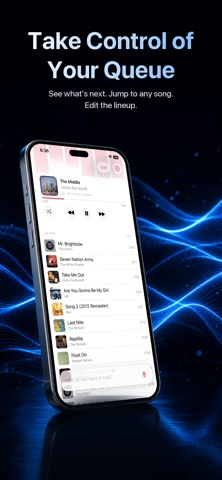
Your music, one sentence away. Open AskPlay and just ask. Type or say what you want — "play something like Radiohead," "queue some 90s hip-hop," "save this as a playlist" — and AskPlay's AI makes it happen. No menus. No digging. No breaking your flow. - Please note, to access the app and all of its features, it is required: an Apple Music subscription, access to Apple Intelligence Private Cloud Compute or an AI provider API key, and to purchase a subscription to AskPlay. - WHAT YOU CAN SAY ▸ Play anything "Play Abbey Road by The Beatles" · "Put on some Daft Punk" ▸ Build a mix on the spot · Real, hand-picked songs for any mood, era, or theme. "Play the best of the 2000s" · "Play upbeat summer songs" ▸ Discover more like it "More like this" · "Bands like blink-182" · "Songs like my gym playlist" ▸ Start a station "Play smooth rock radio" · "Play my personal station" ▸ Run the queue "Queue some Led Zeppelin" · "Play Redbone next" ▸ Control playback "Skip this" · "Shuffle on" · "Repeat this song" · "Skip to 1:30" ▸ Grow your library "Add this to my library" · "Add this to my Chill Vibes playlist" · "Heart this" ▸ Just ask "What's playing?" · "Who sings this?" · "What's next?" BUILT TO UNDERSTAND YOU AskPlay knows the difference between play, queue, play-next, and make-a-mix — even from subtle wording. It handles nuance ("don't play anything like Nickelback" won't backfire), offers clear choices when you're vague instead of erroring out, and makes a confident best guess rather than pestering you with questions. TYPE OR TALK Tap the mic and start talking, or just type. AskPlay can pause your music while you speak, then pick right back up. PLAYLIST MAKER The separate Playlist Maker allows you to build the perfect playlist, with help from AI. SIRI & SHORTCUTS Integrates with Siri and Shortcuts so that you can ask for music, even when outside the app. MADE FOR EVERY SCREEN Designed for iPhone, iPad, and Apple Vision Pro. Now Playing, artwork, and your full queue are always a glance away — tap any track to jump to it, swipe to remove, or drag to reorder. On iPad and Apple Vision Pro, a spacious Listening Desk sets your cover art beside the queue. YOUR AI, YOUR CHOICE AskPlay is bring-your-own-provider. Connect OpenAI, Anthropic (Claude), or OpenRouter, pick your exact model, and control your own usage. Your key stays in your device's Keychain — never on our servers. PRIVATE BY DESIGN Your prompts and listening history aren't logged. No account beyond your App Store subscription, AI key, and Apple Music. Your taste stays yours. - Privacy Policy: https://www.askplay.app/privacy Terms of Use: https://www.apple.com/legal/internet-services/itunes/dev/stdeula/ Apple and Apple Music are trademarks of Apple Inc., registered in the U.S. and other countries.
Latest release
What’s New
- Added new widgets to make AskPlay usable from outside the app - Added a new setting to keep the queue more consistently as a playlist - Added new /commands for quick actions when typing
Audience growth
Ratings growth
Baseline captured. Growth appears after the crawler observes a changed rating count.
Momentum comes from crawler snapshots for the tracked storefront. “Viral growth signal” means unusually fast recent rating gains; it is an indicator, not download data.
Price tracking
Price intelligence
First snapshot captured. The trend line starts after the next crawler price observation.
- First observed Sep 30, 2026 · 9:08 AM Free
Screenshots