About this app
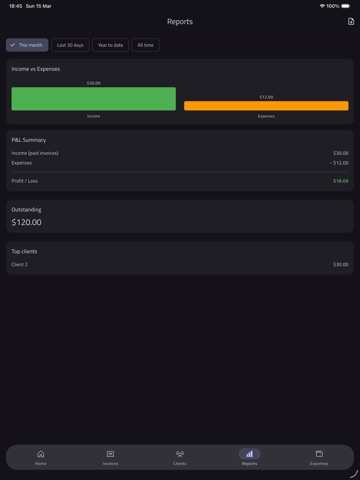
Invoice Suite puts professional invoicing and simple business reporting in your pocket. Create and send invoices and estimates, manage clients, record payments, and see how your business is doing—without spreadsheets or complicated software. INVOICES & ESTIMATES • Create invoices and estimates with line items, quantities, and unit prices • Apply tax per line or use your default tax rate • Set issue and due dates; track status: draft, sent, paid, overdue, or cancelled • Record payments (amount, date, method) and keep a full payment history • Convert estimates to invoices in one tap • Optional payment link on each invoice PROFESSIONAL PDFs • Generate PDFs from your invoices and estimates • Choose from multiple templates: Classic, Minimal, Bold, Modern, Elegant, Compact, Professional • Preview before sharing; share via Mail, Messages, or any app • Add your company logo and signature on PDFs (Pro) CLIENTS • Store client name, email, phone, address, company name, and tax ID • Attach clients to invoices and estimates; see client details from any invoice REPORTS • Dashboard with outstanding total, overdue count, and recent invoices • Income vs expenses with date ranges: This month, Last 30 days, Year to date, All time • P&L summary: income (paid invoices), expenses, profit/loss • Outstanding and overdue amounts; top clients by revenue • Export reports as CSV to share or use in other tools EXPENSES (Pro) • Track expenses with category, amount, date, and notes • Attach receipt photos from camera or gallery • Categories include: Bank fees, Equipment, Marketing, Meals, Office, Rent, Software, Travel, and more • Expenses feed into reports for a full picture of income vs spending SETTINGS & SECURITY • Company profile: name, email, phone, address for PDFs • Currency: choose from many supported currencies (USD, EUR, GBP, etc.) • Default tax rate and invoice number prefix • Payment details (e.g. bank account, transfer instructions) printed on PDFs • Light, dark, or system theme • App lock: require Face ID, Touch ID, or device PIN when returning to the app • Backup: export all data to a JSON file; restore from a previous backup on this or another device FREE VS PRO • Free: Create up to 3 invoices and 3 clients; use selected PDF templates; ads may be shown • Pro: Unlimited invoices and clients; Expenses tab; all PDF templates; logo and signature on PDFs; no ads. Available as monthly subscription, yearly subscription, or one-time lifetime purchase Terms of Use (EULA): https://www.apple.com/legal/internet-services/itunes/dev/stdeula/Invoice Suite keeps your data on your device. Export backups whenever you want and restore them to stay in control of your business data.
Latest release
What’s New
Bug Fixes
Audience growth
Ratings growth
Baseline captured. Growth appears after the crawler observes a changed rating count.
Momentum comes from crawler snapshots for the tracked storefront. “Viral growth signal” means unusually fast recent rating gains; it is an indicator, not download data.
Price tracking
Price intelligence
First snapshot captured. The trend line starts after the next crawler price observation.
- First observed Sep 2, 2026 · 8:57 AM Free
Screenshots