About this app
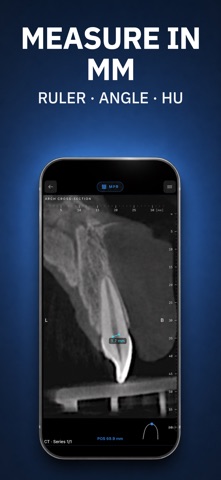
Your CT scan shouldn't be locked in a hospital system. MedScan puts it on your iPhone and iPad — instantly. Open any DICOM file. Scroll through slices. Adjust window and level. Measure distances, angles, and regions. No login, no cloud, no waiting. Your images stay on your device. New to MedScan? Try it right now with built-in sample scans — no DICOM file needed. WHAT YOU CAN VIEW - CT / CBCT scans — full volumetric scrolling and multi-planar reconstruction (MPR) - MRI studies — axial, sagittal, coronal views - Panoramic X-rays — dental OPG with full-width viewing - Periapical X-rays — intraoral dental images - Cephalometric X-rays — orthodontic analysis - External photos — clinical images attached to DICOM studies PROFESSIONAL TOOLS - Window/Level adjustment — fine-tune contrast for soft tissue, bone, or lung - Pan, zoom, rotate — navigate images with natural gestures - Ruler & angle measurement — precise distance and angle tools - ROI & HU statistics — measure regions with Hounsfield values - Multi-panel layout — compare slices side by side - MPR reconstruction — view CT/MRI in any plane - 3D volume rendering — real-time rotation with bone, teeth, and airway presets - Panoramic arch — trace the dental arch, review cross-sections, and export a PDF report - Slice scrolling — smooth navigation through hundreds of slices BUILT FOR DENTAL PROFESSIONALS MedScan understands dental DICOM. CBCT scans, panoramic OPGs, periapical films, and cephalometric X-rays are automatically detected and displayed with the right tools. No configuration needed — just open and view. RADIOLOGY ON THE GO Review studies from the hospital, clinic, or imaging center. Share screens with patients to explain findings. Second-opinion a scan without sitting at a workstation. PRIVACY FIRST - No account required - DICOM images never leave your device - No DICOM upload to the cloud WORKS WITH ANY DICOM SOURCE Import from AirDrop, Files app, email attachments, USB drives, a web link, or download from your PACS. MedScan reads standard DICOM (.dcm) files from any scanner manufacturer. Whether you're a radiologist reviewing a CT, a dentist checking a CBCT, an orthopedic surgeon planning a procedure, or a patient wanting to see your own scan — MedScan is the fastest way to view medical images on iOS. FOR REFERENCE ONLY. Not intended for primary diagnostic use. Privacy Policy: https://medscan.nomly.space/privacy Terms of Use: https://medscan.nomly.space/terms
Latest release
What’s New
Small changes and bug fixes.
Audience growth
Ratings growth
Baseline captured. Growth appears after the crawler observes a changed rating count.
Momentum comes from crawler snapshots for the tracked storefront. “Viral growth signal” means unusually fast recent rating gains; it is an indicator, not download data.
Price tracking
Price intelligence
First snapshot captured. The trend line starts after the next crawler price observation.
- First observed Aug 21, 2026 · 6:47 PM Free
Screenshots