About this app
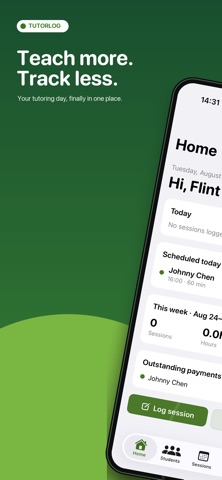
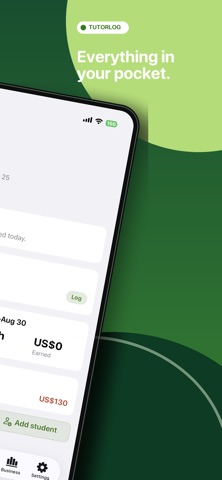
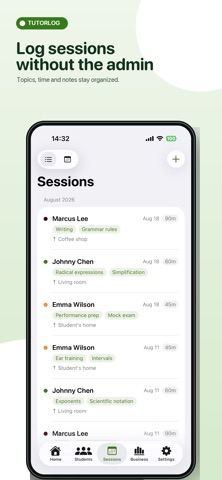
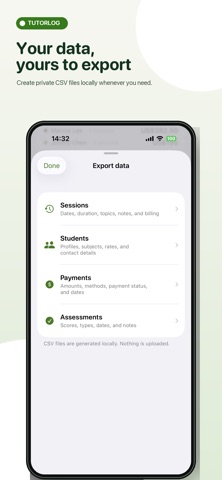
Private tutors: stop piecing together lesson notes, homework, student progress, schedules, and payments across notebooks and spreadsheets. TutorLog is a private tutor lesson tracker and teaching journal for one-to-one educators. Log every session, remember where each student left off, and turn your records into clear progress updates for parents. BUILT AROUND EACH LESSON - Record the date, duration, location, topics covered, homework, and private session notes. - Add multiple topic tags and reuse recent topics in the next lesson. - Track completed and cancelled sessions in a clear calendar. - See weekly and monthly totals for sessions, hours, and earnings. STUDENT PROGRESS YOU CAN EXPLAIN - Keep each student's lesson history, goals, level, schedule, and parent contact details together. - Record quizzes, tests, practice exams, recitals, projects, and milestones. - Review topic frequency to see what you have worked on most. - With Pro, add skill ratings, engagement, homework status, strengths, areas to improve, and next-session plans. - Turn structured records into student progress charts and parent-ready PDF reports. PAYMENTS AND SCHEDULING - Record cash, Venmo, Zelle, PayPal, bank transfer, check, or other payments. - See each student's paid and outstanding totals. - Pro adds Home-screen balance alerts, income charts, recurring weekly sessions, and local reminders. - Export session records as CSV for free; Pro adds bulk student, payment, and assessment exports. PRIVATE BY DESIGN - No TutorLog account or login. - No cloud upload, backend server, advertising, analytics, or AI service. - Student records stay in local storage on your device. - Parent reports and CSV files are generated on-device. - Face ID / Touch ID app lock and Home Screen widgets are free for everyone. FREE INCLUDES - Up to 3 active students - Unlimited basic session records - Topic, homework, assessment, and payment tracking - Calendar, statistics, per-student balances, and sessions CSV export - Widgets and biometric app lock TUTORLOG PRO Choose a one-time Lifetime purchase or a flexible Monthly subscription. Both unlock the same Pro features: - Unlimited students - Structured session logs - Student progress charts - Parent progress report PDFs - Outstanding balance alerts - Monthly income charts - Recurring schedules and reminders - Bulk CSV export MADE FOR Independent math, science, SAT/ACT, language, coding, music, piano, art, and other private tutors who teach one-to-one and want a focused tool instead of a complex tutoring-business platform. TutorLog does not process payments, provide curriculum, or connect to an educational institution. You enter and manage all records. Monthly renews automatically unless canceled at least 24 hours before the end of the current period. Manage or cancel it in your Apple ID subscription settings. Lifetime is a non-consumable one-time purchase with no recurring charge. Support: captainlongevity@gmail.com Privacy Policy: https://app-legal-pages.vercel.app/tutorlog/privacy Terms of Service: https://app-legal-pages.vercel.app/tutorlog/terms
Latest release
What’s New
TutorLog 1.2 improves billing accuracy and makes your teaching records easier to manage. - Billing is now clearer and more reliable. Session charges, payments received, and outstanding balances are shown separately, while overpayments appear as credit. - Start, pause, resume, and finish a session timer. Active timers remain accurate after backgrounding or relaunching. - Create and restore a complete local backup of your TutorLog data, with validation and rollback protection. - Calendar dates and weekday columns now stay aligned with your regional Sunday- or Monday-first week setting. - Choose the currency for each payment. Multi-currency balances and totals stay separate, and every session keeps its original rate and currency. - Add multiple topics to a session and quickly reuse recent topics. - Create and manage your own custom subjects. - Archiving a student now preserves their history while keeping sessions, payments, schedules, reminders, and related totals consistent.
Audience growth
Ratings growth
Baseline captured. Growth appears after the crawler observes a changed rating count.
Momentum comes from crawler snapshots for the tracked storefront. “Viral growth signal” means unusually fast recent rating gains; it is an indicator, not download data.
Price tracking
Price intelligence
- First observed Aug 7, 2026 · 9:10 PM Free
Screenshots