About this app
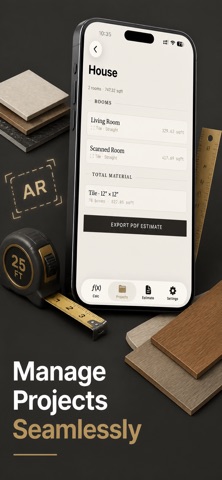
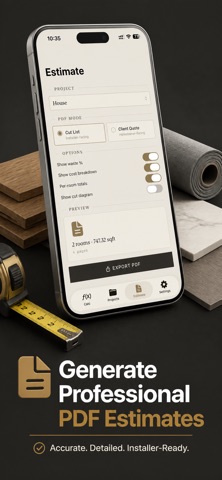
Tired of buying too much flooring — or worse, running out mid-job? Floor Calculator turns any room into an accurate material order in seconds, with AR room scanning and one-tap client quotes. Here's how it works: scan your room with AR (or measure manually if you prefer), pick your floor type, choose your layout pattern, and Floor Calculator instantly shows you the exact piece count, box count, waste allowance, underlayment rolls, baseboard linear feet, and total cost. Done. No accounts. No uploads. No tracking. Everything happens on your iPhone. Whether you're a flooring installer pricing a job in front of the customer, a contractor estimating a multi-room renovation, or a DIY homeowner heading to the lumber yard, Floor Calculator is built to be the fastest way to turn a tape-measure reading — or an AR scan — into a buy list and a quote. AR ROOM SCANNING Walk the room and let your iPhone capture the shape. RoomPlan-powered scanning on LiDAR devices, ARKit corner-tapping on others. Manually adjust any wall length after scanning if you want pinpoint accuracy. FULL MATERIAL TAKEOFF Supports tile, plank, carpet, roll, LVP, laminate, and hardwood. Handles rectangle, L-shape, polygon, and stair-tread coverage. Layout patterns include straight, diagonal, herringbone, and staggered plank — each with the correct minimum waste factor built in so you never under-order. ADD-ONS THAT FINISH THE JOB Optional underlayment roll count, baseboard linear feet (perimeter minus doorways), and transition strip totals — toggle on per room. MULTI-ROOM PROJECTS Save unlimited projects with as many rooms as you need. Combine totals across rooms into one consolidated material list and cost estimate. CLIENT-READY QUOTES Generate two PDF outputs from any project: a Cut List for your crew, or a full Client Quote with labor (hourly or per-square-foot), margin, tax, and a signature line at the bottom. Hand it to the customer on the spot. IMPERIAL OR METRIC, ONE TAP Switch units anytime without losing precision. Enter measurements as fractions, decimals, feet-inches, or millimeters — Floor Calculator parses them all. Floor Calculator was built by a tradesperson tired of returning unopened boxes and tired of losing jobs because the quote took three days. Every input field, every default, every PDF row was chosen because it saved a real job real time. 3-day free trial, then $1.99/week. Cancel anytime. Lifetime purchase also available. Terms of Use: https://taxlite.net/floor_calculator/terms.html Privacy Policy: https://taxlite.net/floor_calculator/privacy.html
Latest release
What’s New
What's new in 1.3 • Job status tracking — mark each project Draft, Quoted, Won, Installed, or Archived, right from the project list • Off-cut reuse tips — see which trimmed pieces are long enough to reuse at the start of the next row • Installation progress — check off each cut piece as it's laid, with a live installed count per room • Room blueprint PDF — add a page with dimensioned edge lengths installers can measure against • Site photos — attach on-site photos to a room straight from the camera, no photo library access needed • Material templates — save your usual tile or plank spec once, then load it into any new room Still 100% offline — no data collection, no ads, no tracking.
Audience growth
Ratings growth
Baseline captured. Growth appears after the crawler observes a changed rating count.
Momentum comes from crawler snapshots for the tracked storefront. “Viral growth signal” means unusually fast recent rating gains; it is an indicator, not download data.
Price tracking
Price intelligence
First snapshot captured. The trend line starts after the next crawler price observation.
- First observed Aug 24, 2026 · 4:12 AM Free
Screenshots