About this app
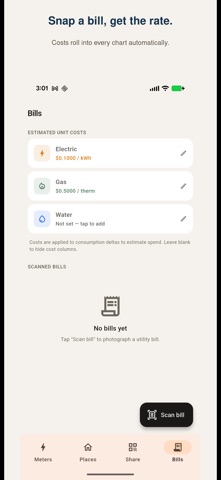
Utilify is a live electric, gas, and water meter reader for your home. The free, open-source RTL-SDR listener runs on a spare phone, Linux PC, Windows PC, or Mac and decodes the ERT, SCM, and IDM radio packets your utility meters already broadcast. Pair an iPhone or iPad to it with a single QR scan and you get real-time kWh, therms, and gallons right in your pocket. No utility-company login. No cloud account. No subscription required to start. A METER READER FOR EVERY UTILITY • Electric meter reader — live kWh and power usage from your electricity meter. • Gas meter reader — live therms and cubic feet from your gas meter. • Water meter reader — live gallons from your water meter. WHAT YOU GET • Live readings as your meter reports them — no waiting for next month's bill. • Per-day usage, cost, and temperature charts with a peak-hour heatmap so you can see exactly when your spend happens. • Photo-scan bill importer that reads usage and rate off any utility bill and updates your per-kWh / per-therm cost automatically. OCR runs entirely on-device. • Multi-address support: track your home, a rental, or a parent's place, each with its own electric, gas, and water meters. HOW IT WORKS ON IPHONE AND IPAD iOS does not allow third-party USB SDR access, so iPhone and iPad work as remote viewers paired to a listener device. Run the listener on a spare phone (with a USB-OTG cable), tablet, Linux PC, Windows PC, or Mac, plus a small USB radio called an RTL-SDR (the "RTL-SDR Blog V4" works great and runs about $30 on Amazon). Pair the iPhone in seconds via a single QR scan. WORKS BEST IN US & CANADA Utilify decodes the ERT, SCM, and IDM packet formats used by Itron and similar smart meters across North America. Meters in Europe and most of Asia use different (often encrypted) protocols and won't decode — please confirm your local meter type before subscribing to Pro. UTILIFY PRO • Unlimited reading history (free tier shows the last 30 days). • End-to-end encrypted FRP tunnel so a viewer device away from your home Wi-Fi can still see live readings. SUBSCRIPTION DETAILS Utilify Pro is an auto-renewing subscription. Two options: • Weekly — $0.99 per week. • Annual — $19.99 per year. Payment is charged to your Apple ID. The subscription renews automatically unless cancelled at least 24 hours before the end of the current period. Your account will be charged for renewal within 24 hours of the end of the period. You can manage or cancel any time in Settings → Apple ID → Subscriptions. A one-time lifetime option is also available — no subscription required. PRIVACY Readings live in a SQLite file on the listener device. We never upload them to a server. The Pro tunnel uses encryption between your own devices only — no third-party intermediary stores your data. Bill-photo OCR runs entirely on-device. Terms of Use (EULA): https://www.apple.com/legal/internet-services/itunes/dev/stdeula/ Privacy Policy: https://adelyons.com/apps/utilify/privacy.html
Latest release
What’s New
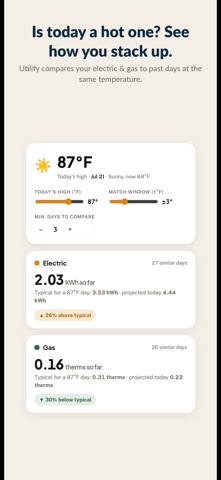
Fixed: Days Like Today now uses the real high for today instead of an estimate, so your usage is compared against days that actually felt like today. Plus under-the-hood updates.
Audience growth
Ratings growth
Baseline captured. Growth appears after the crawler observes a changed rating count.
Momentum comes from crawler snapshots for the tracked storefront. “Viral growth signal” means unusually fast recent rating gains; it is an indicator, not download data.
Price tracking
Price intelligence
First snapshot captured. The trend line starts after the next crawler price observation.
- First observed Sep 8, 2026 · 3:42 PM Free
Screenshots