About this app
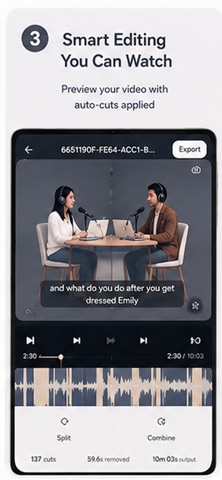
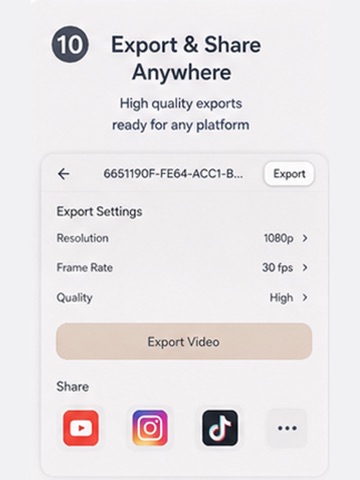
Tired of manually cutting awkward pauses from your videos? QuellCut automatically detects and removes silent segments — so your content sounds polished and professional in minutes, not hours. Whether you're a podcaster, YouTuber, educator, or content creator, QuellCut saves you hours of tedious editing by intelligently finding every pause, dead air moment, and unnecessary silence in your footage. KEY FEATURES: ▸ AUTOMATIC SILENCE DETECTION Import any video and QuellCut instantly analyzes the audio waveform to find every silent moment. Adjust sensitivity with built-in presets — Quiet Room, Normal, or Noisy — or fine-tune manually. ▸ FILLER WORD REMOVAL Go beyond silence. QuellCut detects and removes filler words like "um," "uh," "you know," and more. Clean up speech automatically for a professional result. ▸ REPETITION DETECTION Stumbled over a sentence? QuellCut identifies repeated phrases and false starts so you can remove them with one tap. ▸ SHORTS & CLIPS EXTRACTION Automatically find the most engaging moments in your video and export them as vertical 9:16 Shorts — ready for YouTube Shorts, Instagram Reels, or TikTok. ▸ COLOR GRADING Apply professional color correction presets to give your video a cinematic look — no separate app needed. ▸ AUDIO NORMALIZATION Balance your audio levels automatically to broadcast-standard loudness (-16 LUFS) for consistent, professional sound. ▸ HANDLES ANY LENGTH From 30-second clips to 24+ hour recordings — QuellCut handles it all without breaking a sweat. Perfect for long podcasts, lectures, live streams, and interviews. ▸ FULL CONTROL Review every detected cut on a visual timeline. Toggle individual segments on or off. Adjust padding, minimum silence duration, and blip removal to get exactly the edit you want. ▸ 100% ON-DEVICE Your videos never leave your phone. All processing happens locally — no cloud upload, no waiting, complete privacy. ▸ FLEXIBLE EXPORT Choose your output quality and resolution. Export with original aspect ratio preserved. Share directly or save to your photo library. HOW IT WORKS: 1. Import a video from your library 2. QuellCut analyzes and marks all silent segments 3. Review, adjust, and export your polished video Perfect for: • Podcasters who want clean, tight episodes • YouTubers who need fast turnaround • Educators creating lecture content • Anyone who records video and wants to remove dead air Download QuellCut and turn hours of editing into minutes.
Latest release
What’s New
- Fixed bugs
Audience growth
Ratings growth
Baseline captured. Growth appears after the crawler observes a changed rating count.
Momentum comes from crawler snapshots for the tracked storefront. “Viral growth signal” means unusually fast recent rating gains; it is an indicator, not download data.
Price tracking
Price intelligence
First snapshot captured. The trend line starts after the next crawler price observation.
- First observed Aug 23, 2026 · 7:42 PM Free
Screenshots