About this app
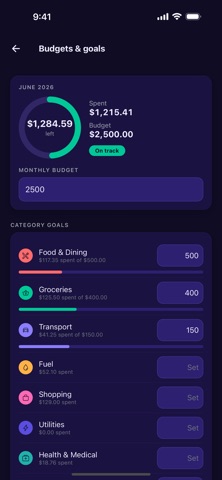
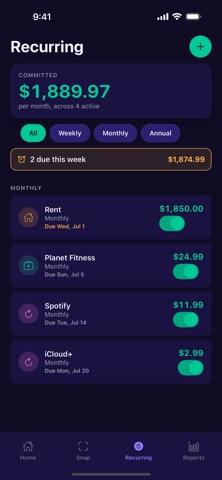
Tuck is the simplest way to track what you spend. Snap a photo of a receipt and Tuck instantly reads the merchant, total, and date — no typing required. Or add an expense by hand or by voice in seconds. Built to be fast, private, and genuinely useful every day. SNAP & GO • Photograph a receipt and Tuck fills in the amount, merchant, and date automatically • Save the receipt image so you always have a record • Add expenses manually or by voice when you're on the move SEE WHERE YOUR MONEY GOES • Beautiful weekly, monthly, and yearly reports • Category breakdowns with a clean spending donut • Spot trends and your biggest categories at a glance STAY AHEAD OF BILLS • Track recurring subscriptions and bills in one place • See what's due this week and log it with one tap • Optional reminders so nothing slips through BUDGETS & GOALS (Tuck+) • Set a monthly budget and per-category goals • Watch a live progress ring on your home screen • Know instantly whether you're on track or overspending WORK EXPENSES (Tuck+) • Tag expenses to a business or employer • Generate a clean date-range expense report • Email it as a PDF in one tap — perfect for reimbursements FOR FAMILIES (Tuck Family) • Add family members and track who spent what • Everyone's spending, organized in one place PRIVATE BY DESIGN • Your expenses are stored on your device, not in an account • No sign-up, no login, no selling your data • Receipt photos are processed only to read the text, never sold Tuck+ and Tuck Family are available as monthly or annual subscriptions. Manual expense entry, receipt scanning, categories, and reports are free to use. Subscriptions auto-renew unless turned off at least 24 hours before the end of the current period. Payment is charged to your Apple Account. Manage or cancel in your App Store account settings. Terms of Use (EULA): https://www.apple.com/legal/internet-services/itunes/dev/stdeula/ Privacy Policy: https://www.teqwiz.com/privacy/tuck Snap it. Tuck it. Done.
Latest release
What’s New
Tuck's biggest update ever: a brand-new receipt camera, trips you can settle up, and your language. ONE-SHOT RECEIPT CAMERA Scanning is one photo now. Point at a receipt: Tuck finds the edges, snaps automatically the moment it's steady, and drops you straight into review. No more multi-page scanner screen — your number one complaint, fixed. 15 LANGUAGES, 22 REGIONS Tuck is now fully localized in 日本語, 한국어, 繁體中文, Tiếng Việt, हिन्दी, Italiano, Bahasa Melayu, Bahasa Indonesia and more — with local date, number, and currency formats everywhere (including NT$, HK$, R$, and whole-number Rp and ₫). TRAVEL MODE, NOW WITH SETTLE-UP Group trip expenses in any currency and see the trip total at a glance. New: tap Split trip evenly and Tuck divides the real trip cost across everyone who came along — counting what each person already owes, so nobody is charged twice. Every trip shows who owes what: text or email each person their itemized share, share the settlement as a picture for the group chat, mark people paid, and export the trip as a spreadsheet. Add your Venmo, PayPal.Me, or PromptPay handle and every note says where to send the money. SMART SPLIT Split any bill with friends and track who's paid you back. TUCK WRAPPED Your month (and year) of spending as a beautiful, shareable story. YOUR BUDGET ON THE LOCK SCREEN A redesigned Live Activity shows today's spending and your month-versus-budget pace at a glance — without opening the app. Off by default; turn it on in Settings. VOICE ENTRY Say it, log it — real on-device dictation in your language, with local amounts like 4,500원, Rp 50.000, or 15€ understood. SNAP, FASTER Batch-import up to 10 receipts, edit scanned amounts inline, and faster, more reliable receipt reading. AUTO-CAPTURE (TH · SG · MY · ID) Paste or forward a bank alert and Tuck drafts the expense — Maybank, CIMB, BCA, Mandiri and more. Tuck never reads your messages itself. HELP WHEN YOU NEED IT A new Help & tips guide covers every feature, right where you need it. Tuck also quietly suggests features you haven't tried — never more than one tip a week. MORE FREE Your full expense history and a monthly budget are now free for everyone. Plus dozens of fixes and polish. Snap it. Tuck it. Done.
Audience growth
Ratings growth
Baseline captured. Growth appears after the crawler observes a changed rating count.
Momentum comes from crawler snapshots for the tracked storefront. “Viral growth signal” means unusually fast recent rating gains; it is an indicator, not download data.
Price tracking
Price intelligence
First snapshot captured. The trend line starts after the next crawler price observation.
- First observed Sep 8, 2026 · 7:27 AM Free
Screenshots