About this app
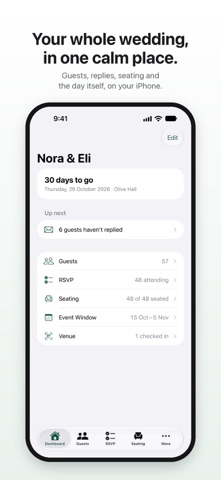
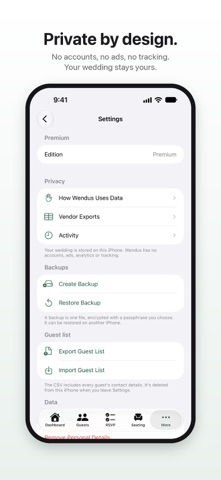
Wendus helps you plan your wedding calmly on your iPhone or iPad, from the first guest list to the moment the last guest arrives. Guests and replies • Bring your list from Excel, CSV, Contacts or a pasted spreadsheet. Guests are grouped into households. • Ask for replies by WhatsApp, Messages or Mail with a ready-to-send message. • Paste a guest's reply and Wendus reads the answer, head count and meals for you to confirm. • Set a reply deadline and get gentle reminders. Digital invitations (new) • Give each household its own invitation link. Guests on iPhone open it in Wendus, free for them, to see the dates, directions, their table and guest pass, and reply in a tap. • Replies update your guest list by themselves. Anyone can still reply in the chat. • Invitations are kept in your own iCloud and end-to-end encrypted. Nobody else, not even Wendus, can read them. Seating • Plan tables from your guest list in one step, with a head table and a seat kept free if you like. • Wendus seats every household, keeps apart the people who must sit apart, and tells you what it did. • Seat orders, escort and place cards, and a caterer summary by table. The room and the day • Draw the room to scale or import the venue's floor plan, then place tables, stages, dance floors and exits. • Finalize the plan, send helpers what they need, and check guests in at the door by name or by scanning their guest pass, even offline. • Live arrivals keep every door in sync. Private by design • No accounts, no ads, no analytics, no tracking. • Your wedding is stored on your device and encrypted, with encrypted backups and full deletion when it's over. Explore a complete sample wedding for free. Premium is a one-time purchase, not a subscription, that lets you plan your own wedding for life and can be restored on your devices.
Latest release
What’s New
Wendus 2.0 is a calmer, cleaner app. A new design. Every screen has been redrawn to feel at home on iPhone and iPad: clearer lists, simpler words and less clutter. Digital invitations. Add each household's own invitation link to the WhatsApp or text message you send. Guests on iPhone open it in Wendus, free for them, to see the dates, directions, their guest pass and table, and reply in a tap. Replies update your guest list by themselves. Invitations stay in your own iCloud, end-to-end encrypted, and anyone can still reply in the chat. Replies made easy. Paste a guest's reply and Wendus reads the answer, head count, meals and dietary notes for you to confirm. Set a reply deadline and your own meal choices, get gentle reminders, and ask everyone who hasn't replied in one go. Seating and the day. Numbered seat orders at every table, escort and place cards, a caterer summary with meals by table, and live arrivals that keep every door in sync. You can now withdraw a helper's access at any time. Plus a short setup guide after you unlock Premium, a review step and Undo for guest list imports, address search for every event, international phone numbers for WhatsApp, and many fixes.
Audience growth
Ratings growth
Baseline captured. Growth appears after the crawler observes a changed rating count.
Momentum comes from crawler snapshots for the tracked storefront. “Viral growth signal” means unusually fast recent rating gains; it is an indicator, not download data.
Price tracking
Price intelligence
First snapshot captured. The trend line starts after the next crawler price observation.
- First observed Sep 30, 2026 · 1:24 PM Free
Screenshots