About this app
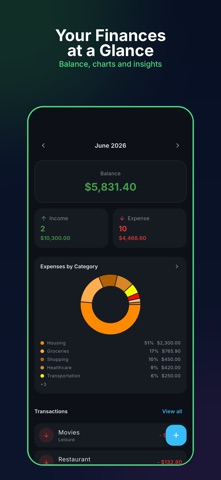
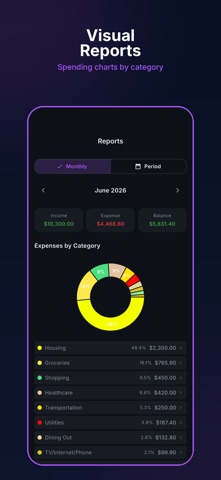
Take control of your personal finances with Despesas — a free, simple and powerful expense tracker designed to help you manage your money effortlessly. Dashboard at a Glance See your monthly balance, income and expenses in one beautiful dashboard. A donut chart breaks down spending by category so you always know where your money goes. Track Every Transaction Add expenses and income in seconds. Organize by date, category and payment status. Swipe to mark as paid or delete — fast and intuitive. Filter by All, Paid or Unpaid. Visual Reports Monthly and custom period charts show your spending patterns. Drill down into any category to see individual transactions. Smart Categories 37 built-in categories covering income, essentials, lifestyle, loans and more. Create unlimited custom categories with your own icons. Installments Split purchases into up to 360 installments. Track what's paid and what's pending at a glance. Export CSV Export your monthly transactions as a CSV file and share via email, WhatsApp or any app. NFe Scanner Scan Brazilian fiscal notes (NFe) QR codes to auto-fill transaction details — date and amount captured instantly. Multi-Currency Track in BRL, USD or EUR. Automatic detection based on your device locale. Premium Dark Theme Elegant dark interface with navy tones, designed for comfortable use day and night. Choose between Navy, Midnight or System themes. Cloud Sync Your data syncs securely via Firebase. Access your finances from any device with your Google, Facebook or Apple account. No Ads Option Subscribe to remove all ads and enjoy a clean, distraction-free experience. Available in English and Portuguese (BR). Download now and take control of your finances! Despesas Premium is an optional auto-renewable monthly subscription that removes all ads. Payment is charged to your Apple Account at confirmation. The subscription renews automatically unless canceled at least 24 hours before the end of the current period; you can manage or cancel it anytime in your Apple Account settings. Terms of Use (EULA): https://www.apple.com/legal/internet-services/itunes/dev/stdeula/ Privacy Policy: https://codesystemlab.com/privacy
Latest release
What’s New
Security and stability improvements. Keep sending suggestions in the reviews. We read every one!
Audience growth
Ratings growth
Baseline captured. Growth appears after the crawler observes a changed rating count.
Momentum comes from crawler snapshots for the tracked storefront. “Viral growth signal” means unusually fast recent rating gains; it is an indicator, not download data.
Price tracking
Price intelligence
First snapshot captured. The trend line starts after the next crawler price observation.
- First observed Sep 14, 2026 · 3:26 PM Free
Screenshots