About this app
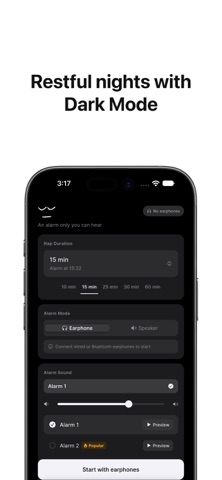
Afraid of waking the person next to you? Never miss an alarm again. 'Nenne' is a nap timer that plays alarm sounds exclusively through your earphones. Because no sound comes through the speaker, you can sleep comfortably at the library, on the subway, or at your office desk without worrying about others. [At a Glance from Your Home Screen] - 3 Home Screen Widgets: Nap Timer, Wake-up Alarm, and Combined Nap + Wake-up Alarm. Check remaining nap time and scheduled wake-up alarms without opening the app. [Personalize to Your Style] - Light & Dark Mode Automatically switches with system settings, or manual selection in Settings. - More Alarm Sound Choices Expanded from 9 to 22 sound options. Browse by theme (melodies, chimes, nature, SFX) and preview before selecting. [Why Earphone Alarm is Different] - Plays ONLY through earphones Alarm audio never leaks to the speaker, so you won't wake people nearby. - Pauses when earphones are unplugged Unplugging your earphones while the alarm is ringing automatically pauses it. No need to hurry and pull out your phone—just remove the earphones to stop the sound. - Resumes when reconnected Plugging the earphones back in resumes the alarm. Designed so you won't miss an alarm if the cable accidentally gets pulled out. - Supports wired & Bluetooth earphones Works seamlessly with both 3.5mm wired earphones and Bluetooth devices. - Switch modes while timer is running If you find yourself alone, switch between Earphone and Speaker modes anytime during the timer. - Precision down to the second Set your target time down to seconds, not just minutes. Set exact times like 15 minutes and 30 seconds effortlessly. [Set Daily Morning Wake-up Alarms] Separate from the nap timer, manage specific time alarms (e.g., "7:00 AM") in a dedicated tab. - Set one-time or repeating alarms by day of the week - Register up to 10 distinct alarm times - Customize earphone/speaker mode, alarm sound, and volume individually - Automatic connection check: alerts you upon saving if Earphone Mode is set without connected earphones [How to Use · Nap Timer] 1. Plug in or connect your earphones. 2. Select your desired nap time down to minutes and seconds (10s to 180m). 3. Choose an alarm sound. 4. Start the timer. 5. When it rings, unplug your earphones or turn it off on screen. [How to Use · Wake-up Alarm] 1. Tap '+' in the Alarm tab to add a new alarm. 2. Select time and repeating days. 3. Set Earphone/Speaker mode, alarm sound, and volume. 4. Save to ring automatically at the set time. [Recommended For] • Students taking quick naps at libraries or study cafes • Commuters napping on subways or buses • Office workers resting at their desk during lunch break • Travelers in dormitories/hostels needing a quiet wake-up call • Anyone needing a nap without waking sleeping family members nearby [Additional Features] • Screen sleep prevention while timer is active • Real-time earphone connection status indicator • Blocks starting timer when earphones are disconnected (prevents mistakes) • Precise timer settings from 10 seconds up to 180 minutes • 22 alarm sounds with instant preview • Direct alarm volume control • Up to 10 scheduled repeating/one-time wake-up alarms • 3 Home Screen widgets & iPhone Lock Screen widget support • System-synced Dark Mode • Multi-language support [No Earphones?] You can still use it as a standard speaker alarm. Select 'Speaker' mode to use it just like a regular alarm app.
Latest release
What’s New
[New Features] - At-a-Glance Records Tab: Check your 1-year nap calendar, streak records, and frequently used nap modes even more intuitively! - Nap Timer Recovery: Don't worry if the app closes unexpectedly. Reopening it restores your remaining time and cancel button seamlessly! - New 'Reset Alarm' Option in Settings: If an alarm won't stop, you can now clear and turn it off with a single tap in Settings! [Improvements & Changes] - Auto-Stop Timer: Unhandled alarms now automatically turn off after 10 minutes to prevent battery drain! - Quiet Alarm Mode: Alarms now run smoothly and calmly without vibration when triggered!
Audience growth
Ratings growth
Baseline captured. Growth appears after the crawler observes a changed rating count.
Momentum comes from crawler snapshots for the tracked storefront. “Viral growth signal” means unusually fast recent rating gains; it is an indicator, not download data.
Price tracking
Price intelligence
First snapshot captured. The trend line starts after the next crawler price observation.
- First observed Oct 8, 2026 · 7:37 AM Free
Screenshots