About this app
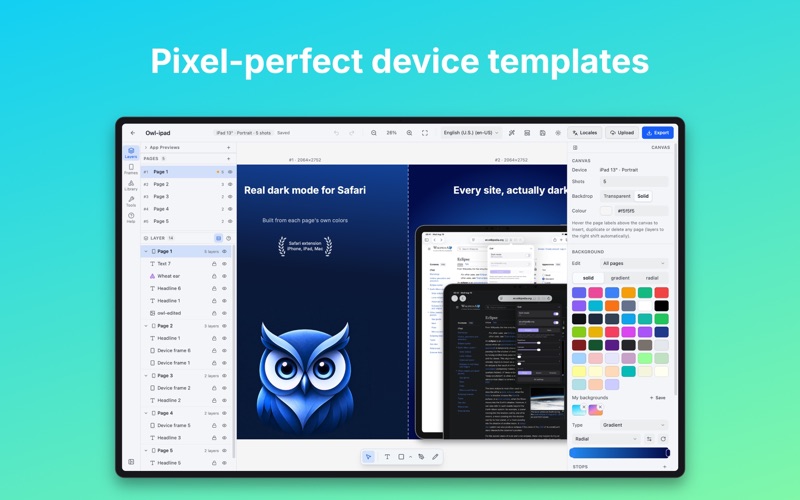
Design store-ready screenshots for the App Store and Google Play right on your Mac — start from a template, frame, localize and upload without leaving the app. A screenshot studio for indie developers, ASO managers and design teams: correctly sized store artwork that passes review the first time. START FROM A TEMPLATE • 30 finished layouts — basic, panorama, showcase, editorial, branded and store artwork — each with its own type, color and hardware. • Six colorways recolor a whole set at once. Apply one to a new project or to work in progress — your text and screenshots stay. • Save any project as your own template, and export or import one as a file. SEND SCREENSHOTS TO APP STORE CONNECT (PRO) • Push finished screenshots to your app's editable version — no ZIP, no browser, no web form. Localizations and screenshot sets are created or matched for you. • Upload App Preview videos too — import, play them in the editor, and assign one to every language at once. • Authenticated with your own API key, which never leaves your Mac. DESIGN THEM FROM CLAUDE CODE (FREE) • A free MCP server lets Claude Code, Codex or any MCP client compose a set, render it through AppShots itself and fix what is off — then export at store size or hand you a project. Install: npx -y appshots-mcp DEVICE FRAMES FOR EVERY STORE • Real bezels across the lineup — iPhone (through 17 Pro and Air), iPad Pro/Air/mini, MacBook and Apple Watch (Series 11, Ultra 3). • Android phone and tablet frames, a Google Play Feature Graphic (1024×500) canvas, and a vector frame for any device. • Pan and scale a screenshot inside its frame — zoom in, or pull back to fit. PANORAMA, PAGES AND LAYOUT • Place 1–10 screenshots side by side and let a background flow across the seams; on export each frame is sliced to its exact pixels. • Drag pages into a new order; a page you add arrives in the layout's own rhythm. • Custom canvas sizes, fixed orientations, and per-page sizes — one project holds both images of an in-app event. A REAL LAYER EDITOR • Text (solid or gradient fill), images, shapes, a magnifier lens, device frames, and drop shadows that follow a bezel's real silhouette. • Solid, linear and radial gradient backgrounds, per page or global, with a pro color picker and eyedropper. • Multi-select, align, distribute, rotate, mirror, scale, snap, lock, reorder, group, undo/redo. BUILT FOR MANY LANGUAGES • Store text per language with automatic fallback to your default. • One-click AI translation (bring your own OpenAI-compatible endpoint), CSV, or a table for every locale at once. • Per-language fonts, and text that shrinks when a translation runs long. • Every major App Store storefront language — and the app itself speaks 11. IMPORT AND EXPORT • Drag in a whole folder, fastlane's screenshots/[locale]/ layout included, and language and frame are set for you. • Export PNG or JPEG in a ZIP that drops into fastlane deliver, every image validated against its target size. • Duplicate a project onto any other device — the layout rebuilds for the new canvas. A DOCUMENT-BASED MAC APP • Every project is a .appshots file you can save anywhere — one per window, a native menu bar, layers copied across projects. • Everything runs locally. Your screenshots and projects never leave your Mac — no account, no server. SUBSCRIPTION DETAILS AppShots is free for up to 10 projects. AppShots Pro unlocks unlimited projects and App Store Connect upload, as a Weekly or Yearly auto-renewable subscription. • Prices are shown in the app and may vary by region. • Payment is charged to your Apple ID at confirmation of purchase, and your subscription auto-renews unless auto-renew is turned off at least 24 hours before the current period ends. • Manage or cancel anytime in your Apple ID settings. • Privacy Policy: https://mzjpg.com/policy/appshots • Terms of Use (EULA): https://www.apple.com/legal/internet-services/itunes/dev/stdeula/ Frame it, localize it, ship it — try AppShots today.
Latest release
What’s New
New in 2.1 • Right-click menus, everywhere. A layer, a page, the canvas, a project card, a saved template, a favorite — each one now answers a right-click with the actions that apply to it, keyboard shortcut shown beside every row. What used to hide behind 12px icons that only appear on hover — duplicate a page, apply a template to it, save a selection to the library, replace an image, give one language its own screenshot — is now under the pointer. ⇧F10 opens the same menu from the keyboard. • Layers gain bring to front and send to back, a project saved to disk gains Show in Finder, and pasting from the canvas menu drops the whole payload centered on the pointer with its layout intact. • Help gets a page of its own on the home screen. The hints and shortcuts used to sit behind a tab in the editor's sidebar — the one place you are not when you are wondering how to start. • AI translation now sends one request per language, up to eight at a time (Settings ▸ AI translation). You get a progress bar, the average a language costs, and a language that fails no longer takes the run with it: everything that came back is written into your text, and you retry only the rest. • Screenshots reach App Store Connect in the order you designed them in. Each set is now given its order explicitly at the end of an upload, so panels can no longer come out shuffled. How many images upload at once is a setting too, 1 to 8 — pick 1 when a shaky connection keeps failing images mid-run. • Pro sits beside the app's name, in the sidebar and in About, which is where you would look to check it. • The bottom of the home sidebar — Upgrade, Settings, Theme, Language, About — is one list of rows now, each stating what it is set to. Fixed: in the Mac app a right-click produced nothing at all — the window's own fallback menu was claiming every click before the app's menus could see it. Thanks for using AppShots!
Audience growth
Ratings growth
Baseline captured. Growth appears after the crawler observes a changed rating count.
Momentum comes from crawler snapshots for the tracked storefront. “Viral growth signal” means unusually fast recent rating gains; it is an indicator, not download data.
Price tracking
Price intelligence
First snapshot captured. The trend line starts after the next crawler price observation.
- First observed Sep 27, 2026 · 12:29 PM Free
Screenshots