About this app
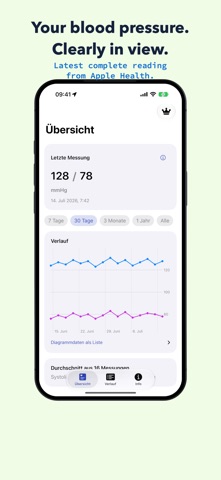
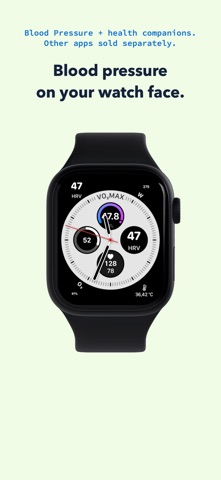
Blood Pressure presents readings already stored in Apple Health in a clear, focused view. AT A GLANCE - Latest complete systolic and diastolic reading - Clear chart across selectable time ranges - Mathematical average and visible reading count - Chronological history with time, source, and device when Apple Health provides them APPLE HEALTH IS THE SOURCE The app only reads existing blood pressure measurements from Apple Health. It never writes or changes health data. Incomplete readings are never combined into an apparently complete result. WIDGETS AND APPLE WATCH Show the latest complete reading in privacy-sensitive iPhone widgets, a Watch complication, or the companion Apple Watch app. It displays values synchronized from iPhone. OPTIONAL REMINDER Schedule a neutral local reminder for your own measurement routine. It contains no readings and never evaluates results. PRIVATE AND FACTUAL - Health data stays on your device and in Apple Health - No account or advertising - Blood pressure values are not used for product analytics - No diagnosis, treatment, risk classification, or medical advice You need a suitable blood pressure cuff or another source that saves measurements to Apple Health. Neither iPhone nor Apple Watch measures systolic or diastolic blood pressure. After the two-day trial access, choose monthly, yearly, or lifetime access. Subscriptions renew automatically unless canceled at least 24 hours before the end of the current period. Manage or cancel them in your App Store account settings. Use Restore Purchases to reactivate an access option you already bought. Terms of Use: https://www.apple.com/legal/internet-services/itunes/dev/stdeula/ Privacy Policy: https://bernhardhering.de/privacy/
Latest release
What’s New
New in version 1.1: - New iPhone widgets for your latest complete reading - A new Watch complication and an improved Apple Watch experience - A refreshed Store presentation that highlights charts, widgets, and Watch features - Stability and display improvements
Audience growth
Ratings growth
Baseline captured. Growth appears after the crawler observes a changed rating count.
Momentum comes from crawler snapshots for the tracked storefront. “Viral growth signal” means unusually fast recent rating gains; it is an indicator, not download data.
Price tracking
Price intelligence
First snapshot captured. The trend line starts after the next crawler price observation.
- First observed Aug 27, 2026 · 12:48 AM Free
Screenshots