About this app
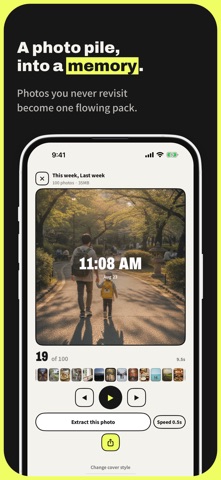
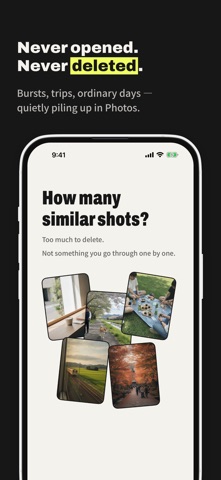
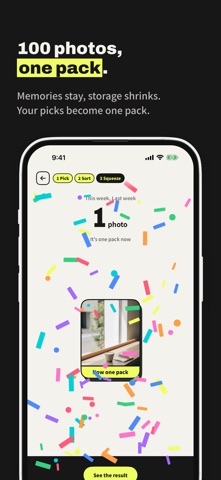
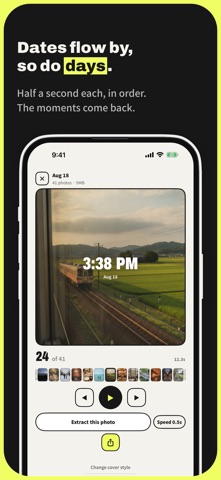
Turn unforgettable photos into a single memory. Organize your photos while looking back on your memories. DAYPACK is a new way to keep your photos by combining accumulated pictures into a single, rapidly flowing video called a "pack." Your original photos won't be deleted automatically. You can choose to keep or organize them after viewing the completed pack. ■ Don't want to delete them. But rarely look back. Photos of your children. Scenery from your travels. Moments with your pets. Meals you spontaneously captured. Casual daily life. You don't want to delete them. Yet, you almost never look back at them one by one. With DAYPACK, you can keep those photos bundled into "packs" by day, week, or trip. Even 100 photos can become a single pack. ■ Relive those days as the dates flow by When you play a pack, photos flow chronologically at 0.5-second intervals. In the center of the screen, the date and time of capture are displayed. It's slightly different from looking at photos one by one, allowing you to look back on the entire flow of that day. You can customize the date/time display and playback speed in the settings. ■ Organize while looking back When creating a pack, you sort your photos one by one into "Pack, Keep, or Delete." Which ones to bundle into the pack. Which ones to keep as original photos. You can organize them step-by-step while reminiscing. Your original photos will never be deleted without your permission. Once the pack is complete, you can choose from "Delete, Review Later, or Keep." If you can't decide, choose "Review Later." You can make up your mind slowly after looking back at the pack. You can also use the app while keeping all your original photos. ■ Instantly find the days you want to look back on The packs you create are listed in chronological order. Travel days, outings with children, and ordinary days. Instead of searching through countless photos, you can look back anytime as a single pack. ■ Share your packs directly Packs can be saved to your Photos app as standard videos. Send them to family and friends, or share them via chat apps and social media. You can watch them anytime, even outside of DAYPACK. ■ Retrieve that single shot later You can pause the pack and export a photo from that exact moment. However, packs are not a perfect backup of your original photos. Exported photos will not regain their original quality or metadata. We recommend keeping your precious photos as originals. ■ Keep your Photos app clean and tidy After saving your memories as a pack, you can organize your original photos as needed. DAYPACK never decides what to delete. You can review the completed pack and organize at your own pace once you are assured that the memories are safely preserved. Organizing your original photos reduces the number of pictures in your Photos app, helping you save storage space. ■ Recommended for: - People who rarely look back at the photos they take - People who find it hard to delete similar photos - People who take lots of photos of their children or pets - People who capture many shots during travels or events - People whose daily photos of meals and scenery keep piling up - People who tend to put off organizing their photos 100 photos, into one. Turn unforgettable photos into a single memory. DAYPACK 利用規約 (EULA): https://www.apple.com/legal/internet-services/itunes/dev/stdeula/
Latest release
What’s New
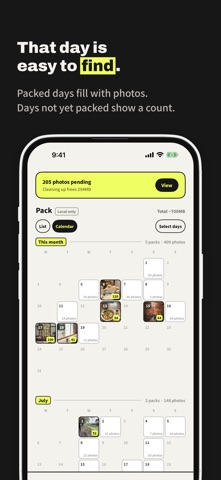
The pack list now has a calendar. Switch between “List” and “Calendar” at the top of the list. Days you've packed are filled with the pack's cover, and days with photos you haven't packed yet show how many, so you can see at a glance what's left. Tap a day to pack it right there, or use “Select days” to pack several days at once. Other improvements: - Fixed the close button sometimes not closing a pack you were viewing - Fixed the screen sometimes staying open after you deleted a pack - Photos are a little bigger while you view a pack — the spare space at the bottom is gone - Tidied up the prices in DAYPACK Pro, with no stray decimals
Audience growth
Ratings growth
Baseline captured. Growth appears after the crawler observes a changed rating count.
Momentum comes from crawler snapshots for the tracked storefront. “Viral growth signal” means unusually fast recent rating gains; it is an indicator, not download data.
Price tracking
Price intelligence
First snapshot captured. The trend line starts after the next crawler price observation.
- First observed Aug 25, 2026 · 10:39 PM Free
Screenshots