About this app
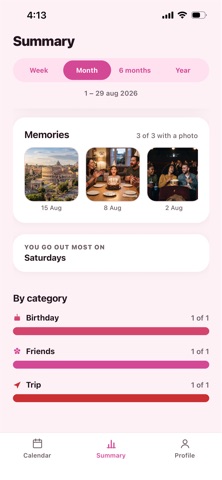
Plandario is a calendar made for two. Add a plan on your phone and it appears on your partner's, right away. No screenshots, no "did you write it down?", no showing up on different days. ONE CALENDAR, TWO PHONES Everything you plan together lives in the same place, and both of you see it change as it happens. NEVER MISS YOUR ANNIVERSARY Set the day you got together. Plandario counts the days, tells you how long it's been, and reminds you both three days before — early enough to prepare something — and again on the day itself. MADE FOR REAL PLANS · Sort by what it is: date night, anniversary, trip — or make your own · Write where you're meeting and open it in Maps from the plan · Reminders on the day, on both phones, with a sound you choose · Send a plan by message to anyone, even before you're connected SEE HOW YOU'RE DOING A summary of the plans you've had together and how each one went, month by month, so the good stretches are visible and the quiet ones don't go unnoticed. ONE SUBSCRIPTION FOR THE TWO OF YOU Your partner joins with a code and pays nothing. One subscription, two phones. PRIVATE No ads. No tracking. No selling anything to anyone. The photo of you two never leaves your phone. Plandario is available in English and Spanish. Plandario is a subscription. $6.99 per month or $39.99 per year. Prices shown in USD. The final price is displayed in your local currency before you confirm. One subscription covers two phones. Payment is charged to your Apple Account at confirmation of purchase. The subscription renews automatically unless it is cancelled at least 24 hours before the end of the current period. You can manage or cancel it in your Apple Account settings. Terms of Use (EULA): https://www.apple.com/legal/internet-services/itunes/dev/stdeula/ Terms of Service: https://plandario.netlify.app/terminos.html Privacy Policy: https://plandario.netlify.app/privacidad.html
Latest release
What’s New
• Delete a category right where you use it. Press and hold a category when you're writing a plan and it's gone — no trip to Settings. Its plans move to another category instead of disappearing. • Sound previews no longer pile up. Trying a second tone stops the first one, and leaving Settings stops it too, so you can actually compare them. • Five new category icons: a toast for date night, the beach, family, a dog and a cat, plus four old ones redrawn so you can tell what they are. • Category colours now come from the icon, so two categories only share a colour when they have something in common. • Add a photo to a plan and see them all together under Memories, in the summary. Photos stay on the phone that added them. • Your couple photo is now a wide banner instead of a small circle. • The time and reminder now sit in one tidy block instead of two half-empty cards. • Redeem an offer code straight from the app, without going to the App Store.
Audience growth
Ratings growth
Baseline captured. Growth appears after the crawler observes a changed rating count.
Momentum comes from crawler snapshots for the tracked storefront. “Viral growth signal” means unusually fast recent rating gains; it is an indicator, not download data.
Price tracking
Price intelligence
First snapshot captured. The trend line starts after the next crawler price observation.
- First observed Sep 1, 2026 · 1:32 PM Free
Screenshots