About this app
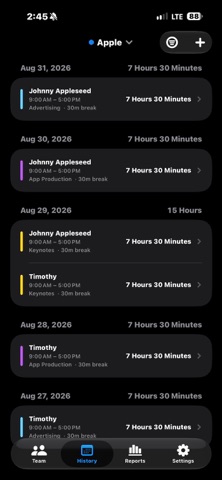
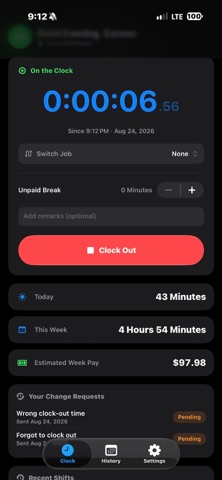
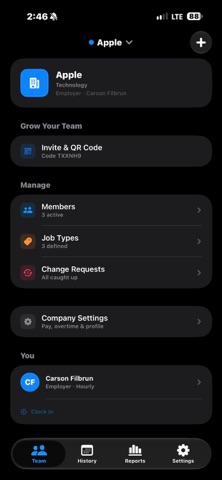
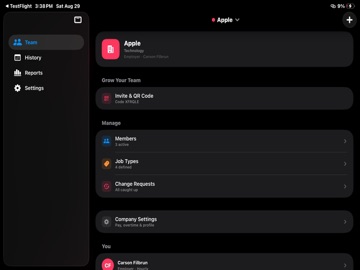
TimeClock is a professional time-tracking and workforce management app for small businesses, crews, and teams. Clock in with a single tap, track hours accurately down to the second, and give owners and managers a clear, real-time view of who is working — without spreadsheets, paper cards, or expensive back-office software. Built for the way real teams operate, TimeClock keeps employees focused on a simple, fast clock while giving owners and managers the controls they need to run payroll-ready records. WORK THE CLOCK • One-tap clock in and clock out with a live running timer • Assign work to job types and switch jobs mid-shift without clocking out • Optional seconds and milliseconds on the timer • Confirm-before-clock-out safeguard to prevent accidental taps • See today's and this week's hours at a glance BUILT FOR TEAMS • Create a company and invite your team with a simple QR code • Three clear roles — Owner, Manager, and Employee — each with the right access • Manage your full roster: add members, set pay, activate or deactivate access • Owners and managers get a live view of everyone currently on the clock ACCURATE PAY AND OVERTIME • Hourly or salaried pay setup per member • Automatic weekly overtime, daily overtime, and daily double-time • Custom thresholds, overtime multipliers, and time rounding • Choose your currency and pay period — weekly, bi-weekly, semi-monthly, or monthly • Live estimated pay while a shift is running RECORDS YOU CAN TRUST • Every shift stored and grouped by day with running daily and weekly totals • Owners and managers can add or adjust entries directly • Employees submit change requests with a reason; managers approve or reject • A clear history so nothing gets lost between pay periods STAY IN THE LOOP • Lock Screen Live Activity and Dynamic Island show the running shift at a glance • Manager alerts when team members clock in or out • Long-shift reminders so no one forgets to clock out • Weekly pay summary notifications PRIVATE SYNC ACROSS YOUR TEAM • Data syncs securely through iCloud so owners and employees stay in sync in real time, even across different Apple Accounts • Works offline — changes sync automatically when you're back online • No third-party accounts to create and no advertising trackers DESIGNED FOR iPHONE AND iPAD • Clean, modern interface that adapts to light and dark mode • Haptic feedback and a focused, distraction-free layout Whether you run a small crew, a shop, or a growing team, TimeClock replaces the guesswork with accurate, organized, payroll-ready time records. Note: TimeClock helps you track hours and estimate pay. It is a record-keeping tool and does not file taxes or issue payments.
Audience growth
Ratings growth
Baseline captured. Growth appears after the crawler observes a changed rating count.
Momentum comes from crawler snapshots for the tracked storefront. “Viral growth signal” means unusually fast recent rating gains; it is an indicator, not download data.
Price tracking
Price intelligence
First snapshot captured. The trend line starts after the next crawler price observation.
- First observed Sep 3, 2026 · 8:04 PM Free
Screenshots