About this app
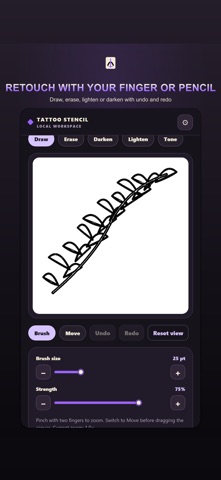
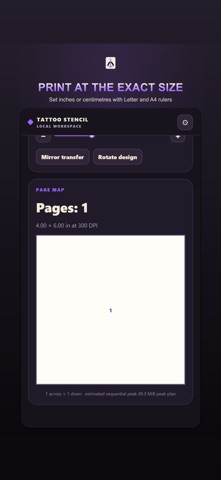
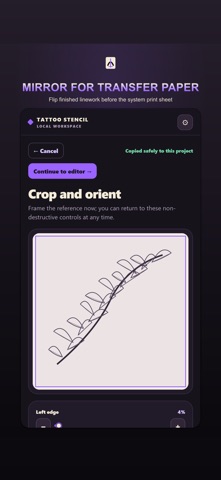
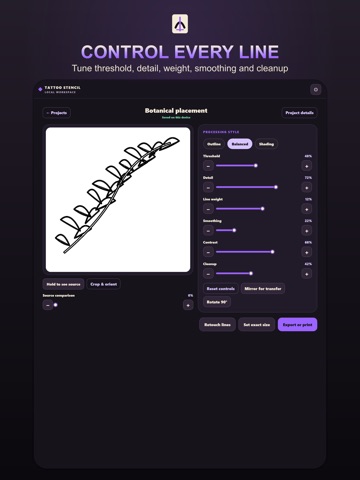
Tattoo Stencil Maker: Print turns reference photos, sketches and authorized artwork into clean, editable stencil linework on your iPhone or iPad. LOCAL PHOTO AND FILE IMPORT Choose an owned or authorized reference from Photos or Files. The app copies it into local project storage, respects its orientation and keeps the original available beside the stencil. THREE STENCIL STYLES Preview Outline, Balanced and Shading treatments from the same reference. Outline reduces tonal fields, Balanced keeps major shade boundaries and Shading adds deterministic stipple and hatching. CONTROL EVERY LINE Adjust threshold, detail, line weight, smoothing, contrast and cleanup while watching the linework respond. Fine controls help preserve important edges without filling the page with noise. MANUAL RETOUCH Refine the stencil by hand with draw, erase, darken and lighten tools. Change brush size, zoom into small details and undo or redo edits without altering the copied source. CROP ROTATE AND MIRROR Crop the working area, rotate the reference into the needed orientation and mirror the finished linework for transfer-paper preparation. Compare the source before committing the transform. EXACT PHYSICAL SIZE Set the intended stencil width or height in inches or centimetres and preview the measured result. A calibration ruler supports a practical check before using valuable transfer material. LETTER AND A4 PAGE SETUP Prepare the stencil on Letter or A4 pages with measured margins and portrait or landscape orientation. Page geometry is calculated from the selected size before output. MULTI-PAGE TILING Preview a large stencil divided across several pages, including page count, overlap and crop marks. Assemble the printed sheets while preserving the intended overall size. PRINT PDF PNG AND SHARE Open the system print sheet, create a measured PDF, export a PNG or use the system share sheet. The print-ready artwork stays clean and the selected action can be cancelled safely. LOCAL PROJECT FOLDERS Keep projects, client labels, notes, measurements and edit history organized in local folders. Search recent work, duplicate a treatment and reopen the saved state after a restart. ON-DEVICE PRIVACY References, edits, client labels and project files are processed and stored on the device. Output leaves the app only when the user chooses Photos, Files, Print or the system share sheet. INTERFACE LANGUAGES Use the interface in English, German, French, Spanish, Italian, Brazilian Portuguese, Dutch, Polish, Russian, Turkish, Japanese, Korean, Simplified Chinese, Traditional Chinese, Hindi, Thai, Vietnamese or Swedish. WORK WITH AUTHORIZED ARTWORK Import only a photo, sketch or design that you own or are authorized to use. Tattoo Stencil Maker supplies preparation tools while the artist remains responsible for the source artwork. Terms of Use (EULA): https://www.apple.com/legal/internet-services/itunes/dev/stdeula/ — Privacy Policy: https://kanac.github.io/syanac-legal/
Audience growth
Ratings growth
Baseline captured. Growth appears after the crawler observes a changed rating count.
Momentum comes from crawler snapshots for the tracked storefront. “Viral growth signal” means unusually fast recent rating gains; it is an indicator, not download data.
Price tracking
Price intelligence
First snapshot captured. The trend line starts after the next crawler price observation.
- First observed Sep 21, 2026 · 6:21 AM Free
Screenshots