About this app
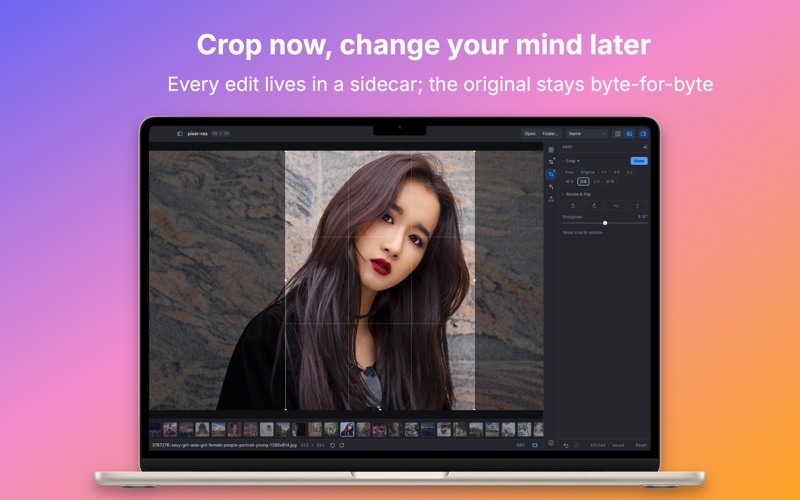
Point Pixer at a folder and it shows you the photos. There is no import step, no library to build, and no second copy of your pictures kept somewhere else. The folder on your disk is the library. Every edit is non-destructive. Adjustments are kept in a small sidecar file beside the photo, so the original stays byte-for-byte untouched — until you deliberately choose File > Save and bake them in. Pixer is free to download. Viewing and hand editing are free to use, with no time limit, no photo count and no watermark. Pixer Pro adds the AI tools, your own presets and LUTs, and batch resize and rename. VIEW ANYTHING • JPEG, PNG, HEIC, HEIF, AVIF, WebP, TIFF, GIF, BMP and PSD • RAW from Canon (CR2, CR3), Nikon (NEF), Sony (ARW), Fujifilm (RAF), Olympus (ORF), Panasonic (RW2) and Adobe DNG • Grid, single photo and filmstrip views, with a folder sidebar for moving around • Arrow through a shoot at full resolution, rotate for viewing, read the metadata and histogram EDIT WITHOUT DAMAGE • Exposure, white balance, contrast, tone and a full tone curve • Vibrance, saturation and per-color HSL • Clarity, sharpening, split toning, vignette and film grain • Crop, straighten and rotate • Brush a mask to hold any adjustment to one part of the frame • Clone stamp, for the spots that need a hand LOOKS • 26 built-in presets across essentials, film, portrait, cinematic, mono and landscape • Copy a look from one photo and paste it onto another • Save your own presets and import any .cube LUT (Pro) EXPORT • JPEG, PNG, TIFF and HEIC • Apply one recipe to a whole batch of photos at once, and export the batch • Or press Save and write the adjustments back into the original • Resize and rename a whole batch on the way out, from a filename template (Pro) AI THAT RUNS ON YOUR MAC (PRO) • Remove the background from a subject • Erase an object and let the photo fill itself back in • Click a subject to select it • Enlarge a photo 4× • Read the light on a face and set the exposure from it All of it runs locally on the CPU. Nothing is uploaded, and nothing needs an internet connection once the models are in place. Those models are fetched once, the first time you use a feature that needs one, so the app itself stays small. PRIVACY Pixer has no account, no sign-in, no server and no analytics. The one and only time it touches the network is to download an AI model you asked for. SUBSCRIPTION DETAILS Pixer Pro unlocks the AI tools, saving your own presets, importing .cube LUTs, and batch resize and rename. It comes as a Weekly or Yearly auto-renewable subscription, or as a one-time Lifetime purchase. • Prices are shown in the app and may vary by region. • The Yearly subscription starts with a 1-week free trial for Apple IDs that have not used it before. • Payment is charged to your Apple ID at confirmation of purchase, and a subscription auto-renews for the same period unless auto-renew is turned off at least 24 hours before the current period ends. • Manage or cancel a subscription anytime in your Apple ID settings. • Any unused portion of a free trial is forfeited when a subscription is purchased. • Privacy Policy: https://www.mzjpg.com/policy/pixer • Terms of Use (EULA): https://www.apple.com/legal/internet-services/itunes/dev/stdeula/ Requires macOS 12 or later.
Latest release
What’s New
• Animated images now play. GIF, APNG, animated WebP and animated HEIC run at their real frame rate. Press P or use the bottom bar to pause and resume. • Transparency is rendered correctly. Images with soft edges no longer show colored fringes, and SVG files appear in full color instead of a black silhouette. • Both views resize. A slider in the grid sets the thumbnail size, and a zoom slider in single-image view runs from Fit to 32×. ⌘+ and ⌘− work in both.
Audience growth
Ratings growth
Baseline captured. Growth appears after the crawler observes a changed rating count.
Momentum comes from crawler snapshots for the tracked storefront. “Viral growth signal” means unusually fast recent rating gains; it is an indicator, not download data.
Price tracking
Price intelligence
First snapshot captured. The trend line starts after the next crawler price observation.
- First observed Sep 27, 2026 · 12:29 PM Free
Screenshots