About this app
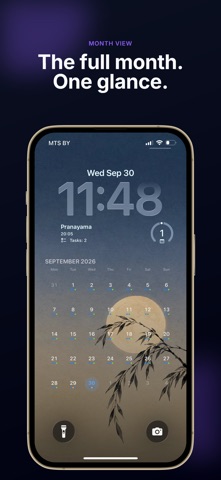
Your day. Always visible. Daily Lock Screen turns your iPhone Lock Screen into a simple daily planner, showing your schedule, upcoming events, and reminders without opening your calendar. Stop searching for what’s next. Just glance at your phone. See your day instantly Keep the information that matters most right where you see it. Upcoming calendar events Next appointment and time Tasks and reminders Today’s schedule at a glance Whether you’re planning work, family, workouts, or personal goals, your day stays visible throughout the day. Your schedule, right on the Lock Screen Add Daily Lock Screen widgets to your iPhone Lock Screen and see what’s coming up whenever you check your phone. Choose the view that works best for you. Next event and remaining tasks Daily progress overview Compact schedule view Turn your Lock Screen into your planner Want more than a widget? Create a custom Lock Screen wallpaper with your schedule built in. Beautiful daily layouts Multiple color themes Custom backgrounds Clean, readable designs Your Lock Screen becomes more than a wallpaper. It becomes a clear view of your day. Built around your privacy Your calendar and reminders stay on your device. Daily Lock Screen uses Apple’s built-in Calendar and Reminders access to display your information. Your personal schedule is not uploaded to external servers. Designed for real life Daily Lock Screen helps you: Start your morning with a clear plan Remember what’s coming next Keep important tasks visible Stay focused without constantly opening your calendar See your priorities at a glance No extra calendar to maintain. Just your day, exactly where you look most. Daily Lock Screen Pro Unlock more ways to organize and display your day with Pro. Pro includes: Additional Lock Screen layouts Weekly schedule views Extended planning views More ways to customize your daily view Your day. Always visible. Privacy Policy: https://apneaapps.top/privacy-en.html Terms of Use (EULA): https://www.apple.com/legal/internet-services/itunes/dev/stdeula/
Audience growth
Ratings growth
Baseline captured. Growth appears after the crawler observes a changed rating count.
Momentum comes from crawler snapshots for the tracked storefront. “Viral growth signal” means unusually fast recent rating gains; it is an indicator, not download data.
Price tracking
Price intelligence
First snapshot captured. The trend line starts after the next crawler price observation.
- First observed Oct 11, 2026 · 12:37 PM Free
Screenshots