About this app
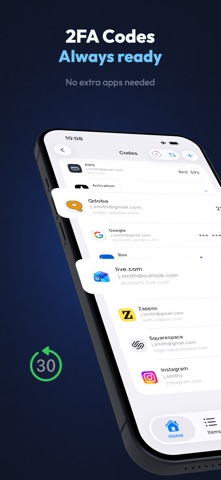
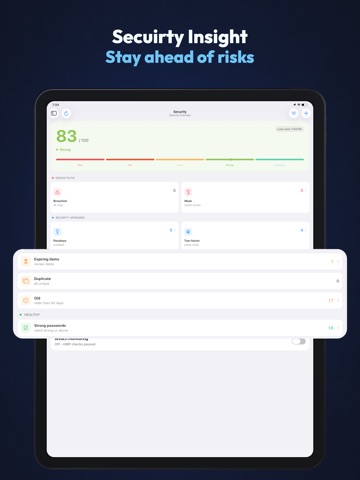
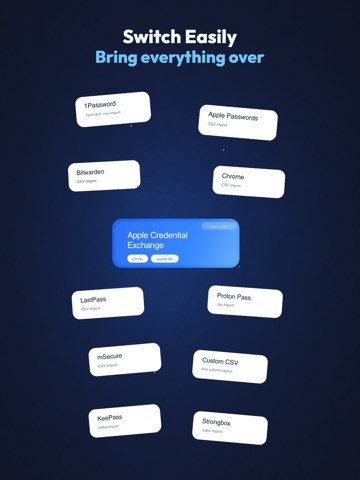
Asterex is a local-first, privacy-first password manager built for iPhone, iPad, Mac, and Apple Watch. It protects passwords, passkeys, 2FA codes, secure notes, attachments, and sensitive records with strong encryption and a zero-knowledge design, so only you can unlock your data. Unlike cloud-first managers, Asterex keeps control in your hands: encrypted local storage by default, with optional iCloud Sync, encrypted backup, and local WiFi Sync when you choose. WHAT YOU CAN STORE - Passwords, passkeys, and secure notes - Credit cards, identities, passports, WiFi credentials, API keys, database logins, software licenses, memberships, subscriptions, and more - Attachments, custom fields, tags, favorites, and linked items - Organized vaults with custom colors and icons, plus fast search and filtering - Location-aware items that can be associated with Apple Maps places PASSWORD, PASSPHRASE, AND USERNAME TOOLS - Password generator with customizable length and character sets - Option to exclude ambiguous characters like 0/O and l/I - Passphrase generator with configurable word count, separators, capitalization, and numeric suffix - Alias Studio for username and email identity generation - Plus-address aliases, catch-all domain aliases, word-blend usernames, and relay aliases through supported providers PASSKEY AND AUTOFILL EXPERIENCE - Passkey support for WebAuthn/FIDO2 - AutoFill for apps and websites - Safari extension support with password and 2FA code autofill - URI match detection controls for more precise website matching - Built-in TOTP authenticator with QR setup and quick copy WIDGETS - TOTP widget for fast access to one-time codes - Subscription widget mode for upcoming billing visibility - Security Score widget for at-a-glance vault health SECURITY FEATURES - AES-256 encryption and SQLCipher encrypted local database - Face ID and Touch ID protection - YubiKey and compatible security key support - Travel Mode to hide selected vaults until revealed with your Master Password - Vault Policies for local rules around access, AutoFill, exports, sync, and travel visibility - Auto-lock and privacy screen - Secure clipboard controls, including auto-clear options - Security Dashboard for weak, duplicate, reused, old, and compromised credential detection - 2FA coverage insights and actionable recommendations IMPORT, EXPORT, AND TRANSFER - Import from 1Password, Bitwarden, Proton Pass, KeePass, Strongbox, Chrome, LastPass, Apple Passwords CSV, mSecure, and generic CSV - Preview imports before adding items to your vault - Select or unselect individual items during supported imports - Encrypted export for backup and migration - App-to-app credential transfer support on compatible iOS versions SYNC AND BACKUP OPTIONS - Local-first by default - Optional iCloud Sync - Optional encrypted iCloud backup and restore - Local WiFi Sync with secure pairing and fingerprint verification - WebDAV Sync - Folder Sync PRIVACY - No tracking, no analytics, no ads - No Asterex-hosted cloud storing your vault - Your master password stays on-device PREMIUM Asterex includes a free tier, with Premium unlocking expanded limits and advanced workflows including advanced protection tools, widgets, vault organization, imports, sync, and backup features. Terms of Use: https://secure.asterex.app/terms Privacy Policy: https://secure.asterex.app/privacy
Latest release
What’s New
- Sync your vault through any folder: iCloud Drive, Dropbox, Google Drive or your own file server - Sync through your own WebDAV server, including Nextcloud, ownCloud and Synology - Set up a new device directly from a folder or server during onboarding - Find your items in Spotlight. Only names are published, never passwords - Option to block third-party keyboards inside Asterex - New Home suggestions for setup you have not finished, plus passwords worth refreshing - AutoFill logins remember which app or site you picked them for - Replacing your vault now asks for that vault's password before anything is removed - Fixed AutoFill showing no logins when your vault was not empty - Fixed Proton Pass imports failing on the whole file because of a single entry - Fixed the attachment count in Settings counting files no item was using - Fixed being unable to delete a tag that items were still using - Fixed several causes of sync not completing or not arriving on other devices - Faster scrolling, switching and editing on Mac, with twelve Quick Access tiles - Spanish translations for the new Home suggestions
Audience growth
Ratings growth
Baseline captured. Growth appears after the crawler observes a changed rating count.
Momentum comes from crawler snapshots for the tracked storefront. “Viral growth signal” means unusually fast recent rating gains; it is an indicator, not download data.
Price tracking
Price intelligence
First snapshot captured. The trend line starts after the next crawler price observation.
- First observed Sep 11, 2026 · 7:57 AM Free
Screenshots