About this app
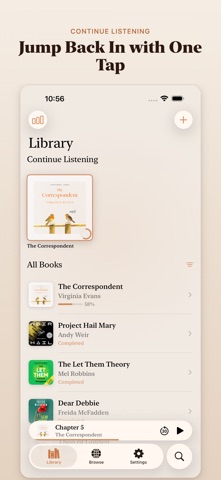
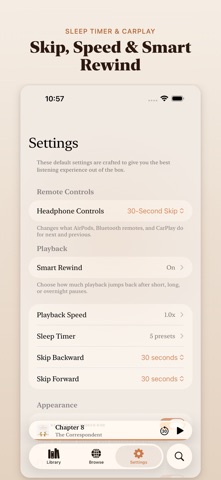
Import your own audiobooks from Files, cloud storage, or WiFi, then pick up exactly where you left off. Smart Rewind, CarPlay, and iCloud sync included. KEY FEATURES - Chapter Recaps with Apple Intelligence: catch up on previous chapters before jumping back in - Browse and save 20,000+ free public domain audiobooks from LibriVox, built right in - Import from anywhere: Files app, iCloud Drive, Put.io, WebDAV, Audiobookshelf, or WiFi Upload from your computer - M4B chapter support and MP3 multi-file audiobooks - Playback settings for skip intervals, remote controls, playback speed, sleep timer presets, and motion effects - Smart Rewind and Continue Listening make it easy to resume after a short break or a long pause - Download books for offline listening, or stream from cloud to save space - Cleaner chapter titles by default, with the option to show original track names inside each book - CarPlay support, Siri Shortcuts, Home Screen widget, Lock Screen controls, and Dynamic Island support - Bookmarks, search, chapter progress tracking, and listening statistics - iCloud progress sync across your Apple devices PRIVATE BY DESIGN Your audiobooks stay on your device and in your own cloud services. No account required, no ads, no tracking.
Latest release
What’s New
• Import every audiobook in a folder at once. • View your library as a List or Grid. • You can now manually edit a book’s title, author, narrator, description, and cover.
Audience growth
Ratings growth
Baseline captured. Growth appears after the crawler observes a changed rating count.
Momentum comes from crawler snapshots for the tracked storefront. “Viral growth signal” means unusually fast recent rating gains; it is an indicator, not download data.
Price tracking
Price intelligence
First snapshot captured. The trend line starts after the next crawler price observation.
- First observed Sep 2, 2026 · 5:09 AM Free
Screenshots