About this app
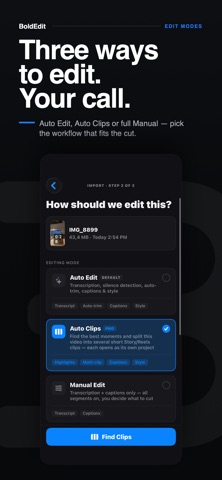
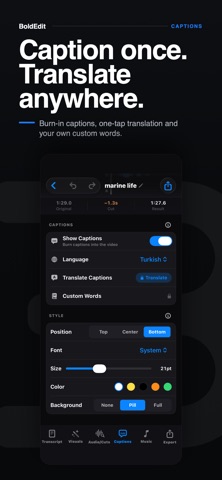
BoldEdit is a complete video editor that runs entirely on your iPhone. Drop in a long talking-head video and get back clean, captioned, ready-to-post clips — no uploads, no account, no waiting on a server. THREE WAYS TO EDIT • Auto Edit — transcription, silence detection, auto-trim, captions and style in one pass. • Auto Clips — find the best moments in a long video and split them into several short Story/Reels clips. Each one opens as its own editable project. • Manual Edit — transcript and captions only. Every segment stays on; you decide what to cut. CUT THE DEAD AIR Silences and filler words ("um", "uh") are detected and shown right on your timeline. Keep them or delete them — one tap. Choose how aggressive the detection is, and add your own filler words. EDIT VIDEO LIKE TEXT Every word is transcribed on your device. Hide a sentence, reorder it, or fix the wording — the timeline follows. Editing video becomes editing a document. CAPTIONS THAT KEEP UP Word-level captions with karaoke highlighting, burned into your export. Position, font, size, color and background are yours to set. Timing is refined on-device with a forced-alignment model. TRANSLATE YOUR CAPTIONS Translate captions into another language, on-device. Your original transcript stays intact — switch between original and translated any time. TEACH IT YOUR WORDS Add your names, brands and jargon to a custom vocabulary — globally or per project — so the transcriber spells them right. STUDIO SOUND Noise reduction, level balancing and speech clarity, all offline. Music ducks automatically under your voice. Fades and per-track volume included. MORE IN THE BOX • Picture-in-picture video, image and logo overlays • Separate audio tracks for voiceover, SFX and music • Merge several videos into one • Style presets — save a look, reuse it on every video • Royalty-free music library, or import your own • Transitions, speed, reverse, split and trim • 9:16, 1:1, 16:9 or original 100% ON YOUR DEVICE Transcription, cuts, captions and translation all run on your iPhone. Your footage is never uploaded. No account required. Works offline, even in airplane mode. BOLDEDIT PRO Pro unlocks Auto Clips export, caption translation, custom vocabulary, unlimited style profiles, 4K export and watermark-free exports. A 3-day free trial unlocks Pro features with no credit card — exports keep the watermark until you subscribe. BoldEdit Pro is an auto-renewable subscription. • Monthly — $4.99 per month • Annual — $29.99 per year Payment is charged to your Apple ID at confirmation of purchase. Subscriptions renew automatically unless auto-renew is turned off at least 24 hours before the end of the current period. Manage or cancel in your Apple ID account settings. Terms of Use (EULA): https://www.apple.com/legal/internet-services/itunes/dev/stdeula/ Privacy Policy: https://mirbedirhankaygusuz.github.io/boldedit-privacy/
Latest release
What’s New
BoldEdit 2.0 — the biggest update yet. NEW · Auto Clips Drop in a long video and BoldEdit finds the best moments and splits them into several short Story/Reels clips — each opens as its own editable project. Fully on-device. NEW · Caption translation Translate your captions into another language, on-device. Your original transcript stays intact. NEW · Custom vocabulary Teach BoldEdit your names, brands and jargon — globally or per project — so captions spell them right. NEW · Multi-track editing Picture-in-picture video, image and logo overlays, and separate audio tracks for voiceover, SFX and music — each with its own volume and ducking. NEW · Merge videos Combine several clips into one project. IMPROVED · Transcript editing Hide, reorder and edit sentences — the timeline follows. IMPROVED · Audio Offline noise reduction, level balancing, and automatic music ducking under your voice. IMPROVED · Captions Word-level timing refined on-device with forced alignment. IMPROVED · Project library Search, sort and date sections — find any project fast. PRIVACY Third-party analytics have been removed entirely. Nothing about your usage or your footage leaves your device. Plus sturdier importing, clearer in-app guidance, and a long list of stability fixes.
Audience growth
Ratings growth
Baseline captured. Growth appears after the crawler observes a changed rating count.
Momentum comes from crawler snapshots for the tracked storefront. “Viral growth signal” means unusually fast recent rating gains; it is an indicator, not download data.
Price tracking
Price intelligence
First snapshot captured. The trend line starts after the next crawler price observation.
- First observed Sep 7, 2026 · 7:37 PM Free
Screenshots