About this app
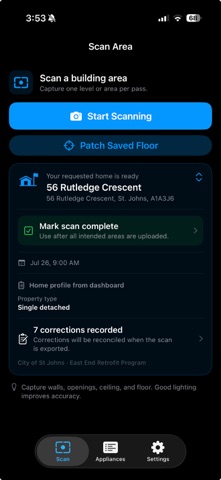
energyi is a field-capture companion for building auditors. It turns LiDAR observations into an interactive building record that can be reviewed, enriched and sent to the EI web dashboard. SCAN ONE AREA AT A TIME Use a LiDAR-capable iPhone or iPad to capture walls, openings, ceilings, floors and visible equipment. Live guidance and coverage checks help you collect stronger evidence before ending a scan. REVIEW THE BUILDING TWIN Explore observed and completed mesh views in an interactive 3D viewer. Fit the building to the screen, switch among Components, Hybrid and Wireframe appearances, and inspect detected or review-needed geometry. ADD COMPONENT DETAILS IN CONTEXT Tap a wall, door, window, opening, floor, ceiling or object in the 3D model. The relevant form opens automatically so you can confirm classifications and enter field data without leaving the scan context. DECLARE APPLIANCES AND SYSTEMS Choose an asset type from the available library and record quantity, make, model, rating-plate information, wattage, age, condition and typical hours of use. The Appliances tab shows the assets declared from your scans. BUILD A MULTI-AREA RECORD Park the current scan when an area is ready, then add another area or level. When fieldwork is complete, Dashboard uploads every parked area as one coordinated building handoff. Assigned jobs can then be marked complete so their status is reflected on the web dashboard. REVIEW BEFORE HANDOFF Check component counts, measurements, confidence indicators and evidence warnings before upload. Scans and declarations remain organized by building area for follow-up. A LiDAR-capable device is required for full 3D scanning. Scan quality depends on device capability, lighting, movement and site conditions. Auditors should review captured evidence and entered values before relying on exported results.
Latest release
What’s New
Version 1.4 introduces a redesigned LiDAR-first field workflow: • Live scan guidance with clearer coverage and tracking feedback. • Digital-twin review for measurements, structural surfaces, openings, and equipment. • Guided preliminary block-load and CSA F280 readiness checks for professional review. • Dashboard-requested home assignments, property confirmation, planned-room progress, and whole-building handoff. • More reliable saved-scan recovery and dashboard export, with required-file checks, clearer errors, safer retries, and account-scoped local data. • Improved sign-in and protection of locally saved audit information. F280 results are preliminary planning estimates, not compliance certificates or professional engineering sign-off.
Audience growth
Ratings growth
Baseline captured. Growth appears after the crawler observes a changed rating count.
Momentum comes from crawler snapshots for the tracked storefront. “Viral growth signal” means unusually fast recent rating gains; it is an indicator, not download data.
Price tracking
Price intelligence
First snapshot captured. The trend line starts after the next crawler price observation.
- First observed Sep 7, 2026 · 11:03 AM Free
Screenshots