About this app
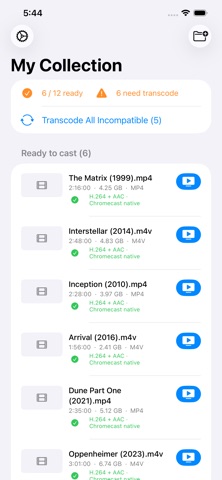
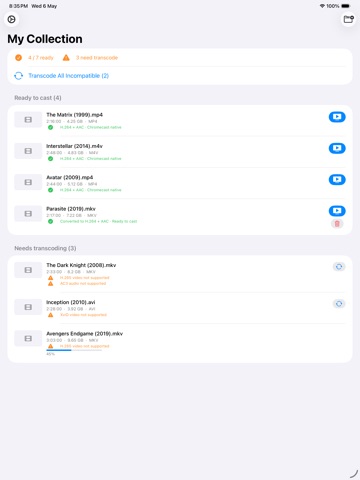
Chromecast Converter Stream any video to your Chromecast — even files it can't normally play. Chromecast only supports a handful of video formats, which means your MKV, AVI, WMV, and other files are stuck on your device. Chromecast Converter fixes that by converting your video to a Chromecast-compatible format on-device, then streaming it directly to your TV — all over your local Wi-Fi. How it works Point the app at a folder and it scans all your media files at once. Compatible files are ready to cast immediately. Incompatible ones are converted using your device's hardware video encoder — fast and efficient — then streamed. No cloud uploads. No subscription. No desktop required. - Files are sorted into ready-to-cast and needs-conversion groups - Convert one file or tap Convert All to batch-transcode in sequence - Cast any file directly from the scan view - Full playback controls: play/pause, seek ±10 seconds, stop On-device everything Conversion uses your device's hardware accelerator for fast, battery-efficient transcoding. A built-in local server streams the result to your Chromecast over Wi-Fi — your video never leaves your network. Requires a Google Cast-compatible device on the same Wi-Fi network as your iPad.
Latest release
What’s New
* Improvements to background streaming * Usability updates
Audience growth
Ratings growth
Baseline captured. Growth appears after the crawler observes a changed rating count.
Momentum comes from crawler snapshots for the tracked storefront. “Viral growth signal” means unusually fast recent rating gains; it is an indicator, not download data.
Price tracking
Price intelligence
First snapshot captured. The trend line starts after the next crawler price observation.
- First observed Sep 11, 2026 · 6:41 AM Free
Screenshots