About this app
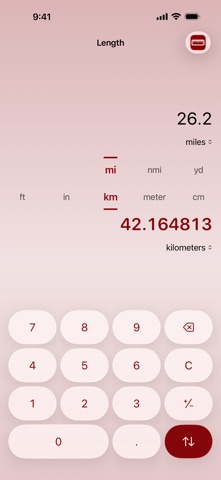
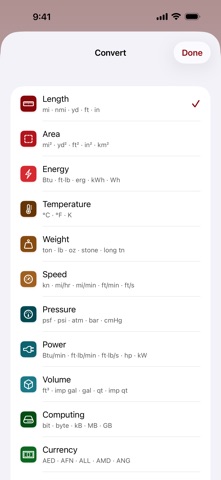
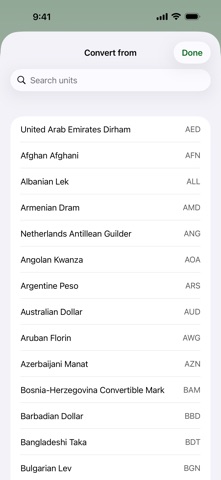
Type a number. Read the answer. That is the entire app. Conversion has been on the App Store since 2012. Version 4 is a complete rebuild — modern, quick, and still refreshingly free of clutter. BOTH UNITS, ALWAYS IN VIEW The two units face each other in the middle of the screen, right where you left them last time. Flick either one to change it, or tap an amount to turn the conversion around. Nothing to drill into. TWELVE CATEGORIES, 96 UNITS Length · Area · Volume · Weight · Temperature · Speed · Pressure · Power · Energy · Time · Computing — and Currency, with more than 160 world currencies. LIVE EXCHANGE RATES Rates refresh on their own and are stored on your device, so conversions still work on a plane or underground. When a rate is out of date the app says so, rather than quietly handing you an old number. YOUR LANGUAGE, YOUR NUMBERS 33 languages. Unit names, decimal separators and numbering systems all follow your region — so a comma lands where a comma belongs, and Arabic and Devanagari numerals are drawn properly. BUILT FOR iOS 26 Liquid Glass, a color for every category, fluid animation, haptics, and Dark Mode throughout. ACCESSIBLE FROM THE START Every control is labeled for VoiceOver. Text scales to the largest accessibility sizes. Reduce Motion is respected. A hardware keyboard drives the whole app. NOTHING COLLECTED No account, no ads, no analytics, no tracking. The app makes one kind of network request — for published exchange rates — and it carries nothing about you. Pay once. No subscription.
Latest release
What’s New
Version 4 is a complete rebuild. • Currency works again. The old rate source shut down years ago; rates now come from a live feed, refresh automatically, and keep working offline. • Redesigned for modern iPhone and iPad — Dark Mode, a color for every category, and an iPad layout that uses the whole screen. • Full VoiceOver, Dynamic Type and Reduce Motion support, plus hardware keyboard input. • 33 languages, with unit names, decimal separators and numerals that follow your region. • Your saved units carry over from the previous version.
Audience growth
Ratings growth
Baseline captured. Growth appears after the crawler observes a changed rating count.
Momentum comes from crawler snapshots for the tracked storefront. “Viral growth signal” means unusually fast recent rating gains; it is an indicator, not download data.
Price tracking
Price intelligence
First snapshot captured. The trend line starts after the next crawler price observation.
- First observed Sep 12, 2026 · 3:53 AM $0.99
Screenshots