About this app
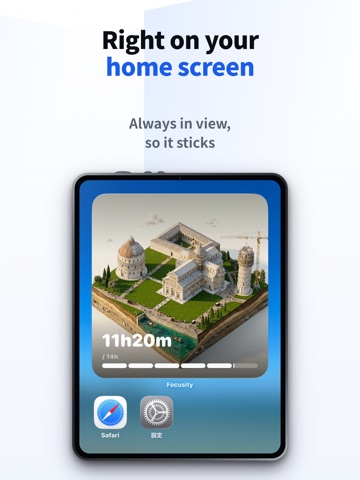
You sat down to get things done. An hour later, you're still scrolling. A quick check turns into endless feeds, videos, and headlines — and the work, the studying, the things that actually matter slide to "later." When you finally look up, all that's left is the same quiet guilt: another day, nothing moved. It's not that your willpower is weak. These apps are engineered by the smartest people and the biggest budgets in the world to do one thing: take your time. So Focusity stopped fighting them on willpower alone. Instead, the time you spend off your phone turns into something you can see — a world wonder, rising one stage at a time. It turns "resisting" into "building." HOW IT WORKS 1. Pick how long you want to focus (15–120 minutes) and start 2. Every focused minute builds a world landmark — Machu Picchu, the Sagrada Família, and more — stage by stage 3. Finish it, and it's yours to keep in your collection Optional: choose apps to block, and they stay locked during your session Because the payoff is something you can actually see, it's a habit that sticks. BUILT FOR YOU IF • You reach for your phone without thinking, and nothing gets done • Plain focus timers felt too cold to stick with • You want to cut your screen time — but actually enjoy doing it FEATURES — Focus, and Wonders Rise While you focus, a diorama slowly takes shape. Machu Picchu, the Taj Mahal, the floating torii of Itsukushima, the Sagrada Família — build the world's landmarks with your own focus. — Ambient Sounds for Deep Focus Rainfall, ocean waves, a forest breeze, alpha waves. Put on a study-friendly soundscape and sink into your work. — Block Apps & Sites Auto-block the apps and websites you don't want to open during a session (powered by iOS Screen Time). Try to open one, and the landmark you're building asks: "Quit now?" The more you block, the faster you build — up to a 2x boost. — Home Screen Widget Your building-in-progress and today's focus time, right on your Home Screen. You see how far you've come without opening the app — and your hand stops reaching for the phone. — Collection Every finished landmark goes into your collection. The row of wonders you've built is proof of every minute you stayed focused. — Bonuses That Keep You Moving Early stages finish fast, so your first sense of progress comes quickly. And if you keep resisting your phone after the timer ends, that time counts toward your build as a bonus. — AI Craft: A City That's Only Yours Enter any theme and AI generates a one-of-a-kind city, made just for you — your own companion to keep you focused. — Share Share your finished landmarks and original cities to social media in a single tap. FOCUSITY PREMIUM • Build premium-exclusive landmarks like Kinkaku-ji and Mont-Saint-Michel • Pick exactly which landmark to build (free plan: random) • See finished landmarks at sunset and lit up at night • View them close-up, looking up, and from the other side • Build the original cities you made with AI Craft • Show your finished builds on the widget • Use all six ambient soundscapes PRIVACY Your focus time and building data are stored on your iPhone. Note: only when you use the AI Craft feature, the theme you enter is sent to a server to generate your city (the images are AI-generated). SUBSCRIPTION • Payment is charged to your Apple ID account • Auto-renews unless canceled at least 24 hours before the current period ends • Manage or cancel anytime in iPhone Settings → Subscriptions Terms of Use: https://hiro0211.github.io/focusity-legal/terms.html Privacy Policy: https://hiro0211.github.io/focusity-legal/privacy.html
Latest release
What’s New
Turn the build boost on or off During a focus session, tap the bolt icon at the top of the screen to switch it. While the boost is off, your building grows in real time. Your blocked apps stay blocked either way, and the multiplier only counts the stretches it was on, so nothing shrinks or jumps when you tap. Bug fix The install bonus was counting above the ×5.0 the app announces. If you blocked a lot of distracting apps, it could reach ×10.0. It now counts at ×5.0.
Audience growth
Ratings growth
Baseline captured. Growth appears after the crawler observes a changed rating count.
Momentum comes from crawler snapshots for the tracked storefront. “Viral growth signal” means unusually fast recent rating gains; it is an indicator, not download data.
Price tracking
Price intelligence
First snapshot captured. The trend line starts after the next crawler price observation.
- First observed Sep 14, 2026 · 6:26 PM Free
Screenshots