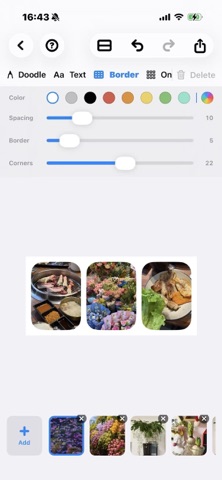
About this app
Build photo collages without borders. Freeform Collage lets you start with one photo and keep expanding—up, down, left, or right—on a canvas that grows with your ideas. No rigid templates. No fixed grids. Just a freeform layout that stays clean and proportional. Made for creative storytelling • Add photos beside any tile to grow your collage endlessly • Horizontal joins match height; vertical joins match width—aspect ratios stay true • Scroll and pinch-to-zoom across a large, fluid canvas • Stage multiple photos and insert them where you want Annotate and refine • Add text overlays for captions and notes • Doodle directly on your collage • Undo and redo with confidence • Save projects and pick up editing anytime Export ready to share • Preview before you save • Export in Standard or High resolution • Save straight to your Photos library Whether you’re comparing outfits, assembling a travel story, planning a moodboard, or creating a keepsake collage—Freeform Collage keeps the process simple, flexible, and beautiful.
Latest release
What’s New
export & import • Export no longer freezes the UI: rendering runs in the background with a progress bar and Cancel • Import (from Photos or Share) uses the same progress style, centered on screen, with cancel support • Share import: choose new or existing project on a full-screen destination page • Share up to 50 photos per share (was 20) • Transparent import report: see selected vs. ready counts, skipped-over-limit items, read failures, and failure previews • Share Extension shows “Reading photo X of Y…” while preparing photos Performance • Smoother canvas on large collages: only visible tiles load and render • Faster project list thumbnails (lightweight preview, background refresh with debounce) • Higher-quality stored photos (JPEG 0.92) • Faster one-tap layout and border adjustments on big projects Editing & design • Text default size 36 pt, max 192 pt; corner tools scale with text size • Border sliders stay in sync after Undo/Redo • Refreshed app icon with softer, more rounded block corners Localization & accessibility • Share Extension and import flow fully localized (English, Simplified & Traditional Chinese) • Fixed string interpolation so counts and labels display correctly in Chinese • Friendlier error messages; Redo and Share buttons now have VoiceOver labels Stability • Fixed Share-from-Photos handoff (blank screen, failed jump to app) • Fixed runtime warnings and Swift concurrency issues in zoom, image cache, and export progress
Audience growth
Ratings growth
Baseline captured. Growth appears after the crawler observes a changed rating count.
Momentum comes from crawler snapshots for the tracked storefront. “Viral growth signal” means unusually fast recent rating gains; it is an indicator, not download data.
Price tracking
Price intelligence
First snapshot captured. The trend line starts after the next crawler price observation.
- First observed Aug 26, 2026 · 11:32 PM Free
Screenshots