About this app
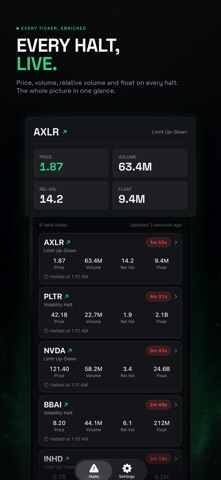
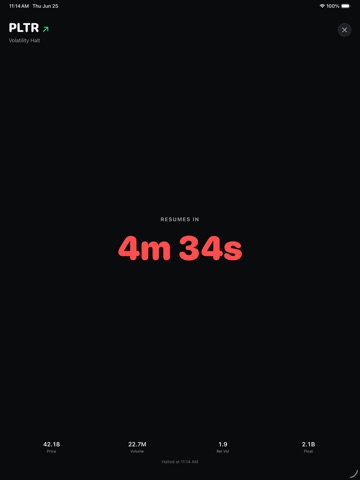
Halt Scanner tells you the moment a NASDAQ stock halts, and the moment it resumes. Your broker's screen is slower. By the time a halt shows up there, the move has usually started without you. Built for traders who trade the halt and the resume. INSTANT ALERTS A push notification and an audio alert the second a halt hits the exchange feed. You do not have to be watching your screen to catch it. A LIVE COUNTDOWN TO THE REOPEN Every halted name carries a running timer to the resume, so you know exactly how much time you have to plan the entry. ONLY THE HALTS YOU ACTUALLY TRADE Filter by reason code (LUDP, T1, T12 and more), and by minimum price, volume, relative volume and float. Set it once and the names you would never touch stop waking your phone. THE NUMBERS THAT MATTER, ON EVERY ROW Price, volume, relative volume, float and the halt reason at a glance. Each halt also shows an up or down indicator, so you can see which way the stock was running when it tripped a volatility pause. SORT AND FILTER THE LIVE LIST Order halts by price, volume, float, relative volume or reason code. REAL TIME, ALL SESSION The list refreshes in the background through the trading day and stays steady while it updates. DARK AND LIGHT Follows your iOS appearance setting. SUBSCRIPTION Halt Scanner is a free download and starts with a 7-day free trial. After the trial, Premium is $9.99 per month or $59.99 per year. A one-time Lifetime unlock is also available for $129.99, with no trial and nothing to renew. Payment is charged to your Apple Account at confirmation of purchase. Subscriptions renew automatically unless cancelled at least 24 hours before the end of the current period, and you can manage or cancel anytime in your Apple Account settings. Terms of Use (EULA): https://www.philliphampton.com/halt-scanner/terms Privacy Policy: https://www.philliphampton.com/halt-scanner/privacy
Latest release
What’s New
Fixes from a trader's bug report — thank you, you know who you are: • Extended halts: when the exchange extends a pause past the standard 5 minutes, the countdown now rolls into the extension instead of stopping at zero. • The full-screen countdown now follows a stock onto its next halt when it halts again, with a badge showing which halt of the day it's on. • New in Settings: Compact display density — a tighter halt list so more fits on screen, built for narrow windows and smaller screens.
Audience growth
Ratings growth
Baseline captured. Growth appears after the crawler observes a changed rating count.
Momentum comes from crawler snapshots for the tracked storefront. “Viral growth signal” means unusually fast recent rating gains; it is an indicator, not download data.
Price tracking
Price intelligence
First snapshot captured. The trend line starts after the next crawler price observation.
- First observed Aug 28, 2026 · 5:39 PM Free
Screenshots