About this app
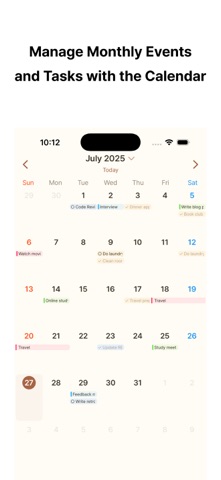
Check your schedule, to-dos, and weather in one place. Haru is a simple calendar app that helps you quickly understand your day and focus on what matters. Instead of checking your calendar, reminders, and weather in separate apps, Haru brings today’s flow together in one clean view. Use the monthly calendar to see the bigger picture, and the weekly calendar to look more closely at your time. Events and to-dos appear together by time, making it easier to plan your day and week. You can also check schedules and to-dos from Home Screen widgets, and complete items directly from the widget. Customize your start screen, calendar view, theme, and other everyday settings to match the way you plan. Key Features • Check today’s schedule, to-dos, and weather in one place • Monthly and weekly calendar views • Calendar events and reminder to-dos shown together • Time-based weekly calendar for a clearer weekly flow • Home Screen widgets for checking and completing to-dos • Start screen, calendar view, and theme settings • Dark Mode support • Simple UX that works without complicated setup • Support for 11 languages See your day more clearly, and organize the flow of your week and month with ease. If you have any questions, issues, or feedback, please contact us at: hsapps.help@gmail.com
Latest release
What’s New
Search is here • Search events and reminders together by title. • Use Smart Views to find overdue, due soon, high-priority, and undated items. • Narrow results by profile and date range, then quickly search again using recent searches. • A new Search tab has been added to the bottom navigation bar. More Shortcuts • Quick Add Reminder: Save a reminder by entering only a title, without opening the app. • Create Event or Reminder: Open the add screen directly. • This Month’s Plans: Open this month’s calendar directly from Siri or Shortcuts. • Connect the new shortcuts to Siri, the Home Screen, or the Action Button on supported devices. Other improvements • Long dates are no longer cut off at the top of the Today screen. • Editing and deleting recurring events now applies accurately to the selected occurrence. • The edit screen safely closes if an event is deleted in another app. • When you try to save without a title, a message now appears directly in the title field.
Audience growth
Ratings growth
Baseline captured. Growth appears after the crawler observes a changed rating count.
Momentum comes from crawler snapshots for the tracked storefront. “Viral growth signal” means unusually fast recent rating gains; it is an indicator, not download data.
Price tracking
Price intelligence
First snapshot captured. The trend line starts after the next crawler price observation.
- First observed Aug 30, 2026 · 7:40 AM Free
Screenshots