About this app
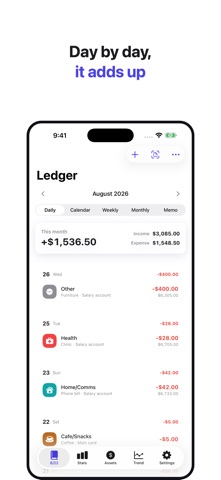
Snap it, and it fills itself in. You just check. Receipts, payment text alerts, the transaction list inside your banking app — photograph or screenshot them, and Harubi reads the date, amount and merchant and fills the entry in for you. Completely free. No account, no bank login. ■ Why photos instead of a bank connection? Every other budgeting app wants your bank credentials, a subscription, or both. Harubi wants neither. · Cash never shows up in a bank feed. A photo of the receipt catches it. · You never hand your bank login to a third party — there is nobody to hand it to. · Nothing to sign up for. Open the app and start. ■ Three kinds of images, sorted out automatically · Paper receipts — merchant, total and date, read straight off the slip. · Payment and card alert messages — screenshot the alert and it becomes one transaction. · Bank and card statement lists — screenshot the transaction list in your banking app and every row is read at once. Whatever you send, a review screen comes first. Correct a misread figure, untick a row you don't want, then save. ■ Several screenshots, stitched into one list A statement never fits on one screen. Scroll, take as many screenshots as you need, and hand them over together. · Overlapping stretches are matched up by running balance, so nothing is imported twice. · If a date header was cut off at the top of a shot, the date is carried across from the neighboring shots. · Transactions you have already saved come back pre-unticked. ■ Share now, sort it out later Send images to Harubi from Photos or Messages with the share sheet. iOS won't let an app launch itself, so nothing happens at that moment — but the next time you open Harubi, everything you shared is waiting and gets sorted in one go. ■ Private by construction · Text recognition runs on your iPhone, through Apple's Vision framework. Photos are not uploaded for processing. · Your transaction records stay on this device. · No account, no login, no bank connection. · Free, entirely. No in-app purchases, no subscription, no ads, no tracking. · Not a single analytics or advertising SDK, and no third-party libraries at all. ■ The budgeting part · Income, expense and transfer entries with a large number keypad · Daily, calendar, weekly, monthly, summary and memo views · Category statistics (pie chart) with period and account filters · Per-category budgets with remaining amount and spending pace · Trend tab — your daily balance, and the transactions behind any day · Balance trend graph per account · Double-entry asset tracking — cash, bank and card balances kept in step · Recurring expenses — rent, subscriptions, anything that leaves on the same day each month · Automatic insights — budgets nearly spent, too much in Other, month-over-month jumps · Backup and restore to a JSON file (photos and videos attached to memos, and recurring-expense rules, are not included in the backup) · On-device AI — a summary of your month and category suggestions for Other (iOS 26 on Apple Intelligence devices) · Light / dark mode and theme colors ■ Receipts we read Korea, the United States, Germany and the Philippines. Japanese receipts are read too (the app interface is not available in Japanese). Budgeting is all about consistency. Start light — just today's spending. iPhone only. Requires iOS 17 or later.
Latest release
What’s New
This release is about the app following the language you pick, all the way through. · Change the language and everything on screen now comes with it. The accounts Harubi sets up for you (Cash, Bank, Card) and the categories it starts you with (Food and the rest) had been keeping the names of the language you first opened the app in. They now read in the language you have chosen — in the entry screen, the Assets tab, Manage assets, and account detail and editing. Any name you have edited yourself stays exactly as you wrote it. · On the account editing screen, the current name is shown in grey as an example. Leave it and it keeps following the language; type your own and that name stays. · The account and category pickers can be pulled up to full height. Four of them showed a grab handle but would not move; they now behave like every other sheet. Useful when the list is long. · On Japanese screens, field labels were being cut off (‘毎月く…’). The label column had a fixed width, so anything longer than Korean ran out of room. It is measured per language now, and the labels read in full. · If a photo does not go through, send it to us with the report button on the review screen. The photos you send are what we fix next.
Audience growth
Ratings growth
Baseline captured. Growth appears after the crawler observes a changed rating count.
Momentum comes from crawler snapshots for the tracked storefront. “Viral growth signal” means unusually fast recent rating gains; it is an indicator, not download data.
Price tracking
Price intelligence
First snapshot captured. The trend line starts after the next crawler price observation.
- First observed Sep 5, 2026 · 9:18 AM Free
Screenshots