About this app
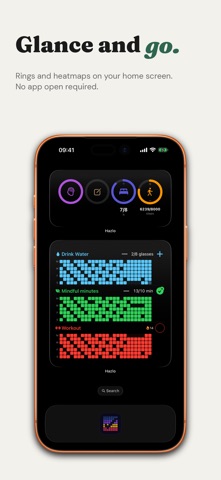
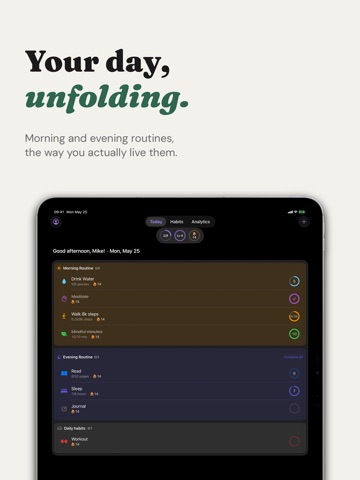
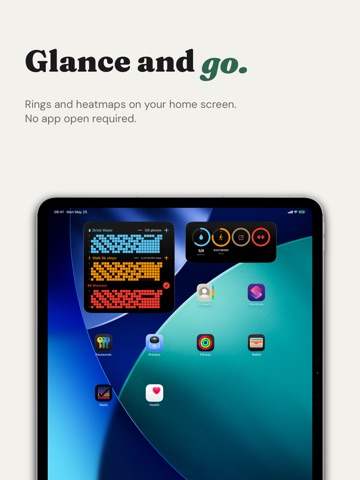
Hazlo is a simple, private, and positive habit tracker built around one idea: celebrate progress, not perfection. Track daily habits, build streaks, earn badges, and watch your progress grow — all without the pressure. Your data stays on your device. No accounts, no social pressure, no leaderboards — just you and your habits. CORE FEATURES • Track up to 5 habits with binary or quantitative goals (steps, pages, glasses of water) • Built-in templates for popular habits — drink water, read, meditate, exercise • Smart reminders per habit, not just generic daily pings • Streak freeze protection — life happens, your progress shouldn't disappear • Kindness Mode — recover broken streaks in 3 days instead of starting over GAMIFICATION THAT DOESN'T PUNISH • XP, levels, and 30+ badges to celebrate milestones • Motivational messages, never shame or pressure • Comeback celebrations when you return after a break • Confetti, haptics, and satisfying animations that respect Reduce Motion ROUTINES & RITUALS • Group habits into morning, evening, or workout routines • Schedule routines by day and time — your morning ritual triggers itself • Templates for popular routines: Morning, Evening, Workout, Mindfulness APPLE HEALTH INTEGRATION Hazlo integrates with Apple Health to automatically complete habits for you. When you link a habit to a health metric, the app reads your daily totals from HealthKit and marks the habit as done once your goal is reached. No manual check-off needed. Supported metrics (read-only — Hazlo never writes to Apple Health): • Steps • Walking & running distance • Exercise minutes • Water intake • Mindful minutes • Sleep hours • Stand hours Health data is used only on your device to determine habit completion. It is never stored, transmitted, or shared with anyone. HealthKit access is entirely optional — you choose which habits to link, and you can revoke access anytime in Settings. APPLE ECOSYSTEM • Home Screen and Lock Screen widgets • Control Center widget for one-tap completion (iOS 18+) • Shortcuts and Siri integration — "Hey Siri, I did my meditation" • Full VoiceOver, Dynamic Type, and Reduce Motion support PRIVACY FIRST • 100% on-device storage via SwiftData • Nothing syncs to our servers. Optional iCloud backup is end-to-end encrypted (Hazlo Pro) • No analytics, no tracking, no ads • Delete all data anytime from Settings Hazlo is free to use. Hazlo Pro is an optional upgrade that unlocks advanced analytics, unlimited habits, custom routines, weekly reflections, iCloud backup, milestone sharing, and more — available as monthly, annual (with a 7-day free trial), or lifetime. Your data stays yours either way. — Hazlo is not a medical device. Habit tracking is for informational and motivational purposes only. Consult a healthcare professional for medical advice. Terms of Use (EULA): https://www.apple.com/legal/internet-services/itunes/dev/stdeula/
Latest release
What’s New
What's new in 1.4: • Auto-complete habits from Apple Health — link Steps, Exercise, Mindful minutes, Sleep, Water and more, and Hazlo fills in your progress automatically. • New Lock Screen widgets — Weekly Progress, a 3-habit Heatmap, and a configurable habit widget you can tap to log. • Sleep now uses Apple's official Time Asleep instead of time in bed. • Refreshed Habits screen — filters and the large title glide behind the Liquid Glass bar, with a tidier toolbar. • Add several habits to a routine at once — select them all, then tap Add. • More reliable widgets — instant refresh after a tap, correct midnight rollover, and no more sample-data flash on the Lock Screen. Everything stays private: your habit and health data never leave your device.
Audience growth
Ratings growth
Baseline captured. Growth appears after the crawler observes a changed rating count.
Momentum comes from crawler snapshots for the tracked storefront. “Viral growth signal” means unusually fast recent rating gains; it is an indicator, not download data.
Price tracking
Price intelligence
First snapshot captured. The trend line starts after the next crawler price observation.
- First observed Aug 28, 2026 · 7:28 AM Free
Screenshots